You check GA4 one morning and see a sudden traffic spike. Exciting, right? Then you look closer and notice it’s all referral traffic from a domain you’ve never heard of. Before you celebrate — or panic — let’s figure out what referral traffic in WordPress actually means, why it spikes, and what you should do about it.
What Is Referral Traffic in WordPress?
Referral traffic is any visit that comes to your WordPress site from another website — not from a search engine, not from social media, and not from someone typing your URL directly. In other words, someone clicked a link on another site that pointed to yours.
For example, if a blogger mentions your article and links to it, every visitor who clicks that link counts as referral traffic. Similarly, if your site appears in a web directory or a forum thread, those clicks are referrals too.
This matters because referral traffic tells you who’s talking about you. It reveals which external sites send visitors your way — and whether those visitors are actually worth anything.
How GA4 Tracks Referral Traffic in WordPress
Google Analytics 4 categorizes your traffic into channels based on how visitors arrive. When someone clicks a link from another website, GA4 checks the default channel grouping rules and assigns it to the “Referral” channel.
Specifically, GA4 looks at the document.referrer value — the URL of the page the visitor came from. If that URL doesn’t match any other channel rules (like Organic Search or Social), it gets labeled as referral traffic.
To view your referral traffic in GA4, navigate to Reports > Acquisition > Traffic Acquisition. Then filter by “Session default channel group” and select “Referral.” You can also see the specific referring domains by adding a secondary dimension for “Session source.”
Additionally, if you’re using a WordPress analytics plugin, most of them surface referral data in simplified dashboards. However, for the full picture, GA4’s reporting gives you more detail — including which specific pages received the referral traffic and how those visitors behaved after arriving.
Good Referral Traffic vs Spam Referrals
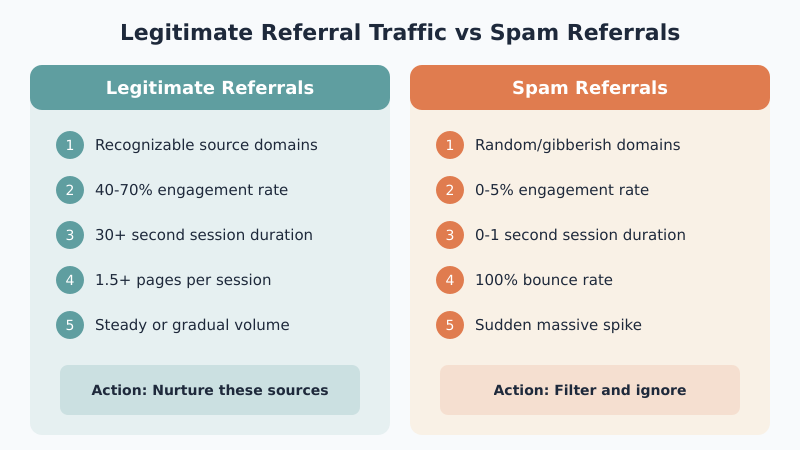
Not all referral traffic is created equal. Some of it represents genuine interest in your content. The rest? Bots, spam, and ghost referrals that inflate your numbers without adding any value.
Here’s how to tell the difference:
| Signal | Legitimate Referral | Spam Referral |
|---|---|---|
| Source domain | Recognizable site, blog, or forum | Random/gibberish domain name |
| Engagement rate | 40-70%+ engagement | 0-5% engagement |
| Session duration | 30+ seconds average | 0-1 seconds |
| Pages per session | 1.5+ pages | 1.0 pages exactly |
| Bounce pattern | Varies naturally | 100% bounce rate |
| Volume pattern | Steady or gradual | Sudden massive spike |
For instance, referral traffic from a site like reddit.com, medium.com, or a niche blog in your industry is almost always legitimate. On the other hand, traffic from domains like best-seo-offer.com or free-traffic-now.xyz is virtually always spam.
The key metric to watch is engagement rate. Legitimate referral visitors actually read your content. Spam referrals bounce immediately because no real person ever visited — it was just a bot hitting your site. If you want to understand engagement metrics better, check out our guide on bounce rate, engagement rate, and time on page.
Why Your Referral Traffic Suddenly Spiked
A sudden spike in referral traffic can mean several things. Before you react, figure out which scenario applies to you.
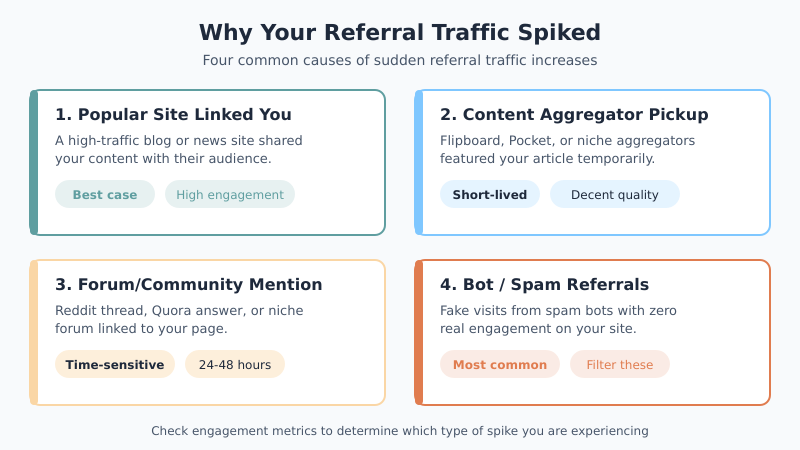
1. A popular site linked to your content. This is the best-case scenario. Someone with a large audience mentioned or linked to one of your posts. Check the referring domain — if it’s a well-known blog, news site, or resource page, congratulations. That’s genuine exposure. As a result, you might see sustained referral traffic for days or even weeks.
2. Your content appeared on an aggregator. Sites like Flipboard, Pocket recommendations, or niche content aggregators can send bursts of referral traffic to WordPress sites. These spikes tend to be short-lived but the traffic quality is usually decent.
3. A forum or community discussion mentioned you. Reddit threads, Quora answers, or niche forum posts can drive significant referral traffic. However, this traffic is often very time-sensitive — most of it arrives within the first 24-48 hours.
4. Bot or spam referrals hit your site. This is the most common cause of unexplained referral spikes. Spam bots crawl your site and leave fake referrer data in your analytics. They’re not real visitors, and they didn’t actually view your content. Consequently, your traffic numbers go up but nothing meaningful changes.
To diagnose which scenario you’re dealing with, look at the referring domain and check the engagement metrics. If the time on site is near zero and the bounce rate is 100%, you’re looking at spam.
How to Filter Spam Referrals in GA4
GA4 handles spam better than Universal Analytics did, but it’s not perfect. Here’s how to clean up your referral traffic data.
First, use GA4’s built-in bot filtering. Go to Admin > Data Streams > your stream > Configure tag settings > Show all > List unwanted referrals. Add any spam domains you’ve identified. This tells GA4 to stop counting traffic from those sources as referrals.
Second, create a data filter for internal traffic. Sometimes referral spikes come from your own domain or staging sites. Therefore, setting up proper internal traffic filters prevents this from muddying your data.
Third, use explorations to verify. In GA4, go to Explore and create a free-form exploration. Set the dimension to “Session source” and filter for the Referral channel. Then add metrics like engagement rate, average session duration, and pages per session. This helps you spot patterns that indicate spam versus legitimate traffic.
For WordPress-specific filtering, some analytics plugins offer built-in spam detection. If you’re using a plugin like Site Kit by Google, the referral data it shows comes directly from GA4, so any filters you apply in GA4 will reflect in the plugin dashboard too.
Tip: Don’t obsess over eliminating every single spam referral. Focus on filtering the high-volume offenders. A few stray bot visits won’t meaningfully affect your data — but thousands from a single domain will.
Making the Most of Legitimate Referral Traffic for WordPress
When you identify genuine referral sources, here’s how to capitalize on them.
Analyze what content attracts referrals. Check which of your pages receive the most referral traffic. If a particular post keeps getting linked, that tells you something about what resonates with other site owners. Use this insight to evaluate which content is actually working.
Build relationships with referring sites. If a blog consistently links to your content, that’s a relationship worth nurturing. Reach out, thank them, and look for collaboration opportunities. These organic connections are far more valuable than any link-building scheme.
Optimize your landing pages. If referral visitors land on a specific page, make sure that page delivers. Check the page speed, ensure the content matches what the referring link promises, and include clear next steps so visitors explore more of your site.
Track referral conversions. In GA4, you can see whether referral visitors complete your key events. Navigate to the conversion reports and filter by the Referral channel. This tells you which referring sites send visitors who actually do something valuable — not just browse and leave.
Furthermore, consider setting up UTM parameters for any partnerships or guest posts. While organic referral links don’t need UTMs, any referral traffic you actively cultivate benefits from proper campaign tracking.
Bottom Line
Referral traffic in WordPress is a mixed bag. Legitimate referrals mean other sites find your content valuable enough to link to — that’s the best kind of traffic you can get. Spam referrals are noise that distorts your data and wastes your time analyzing phantom visitors.
The approach is straightforward: check the referring domain, look at engagement metrics, filter out the obvious spam, and pay attention to the sources that send real visitors. Don’t chase referral volume — chase referral quality. A handful of engaged visitors from a relevant blog post is worth more than thousands of bot hits from a domain you can’t even pronounce.

Written by Ellie
Former Head of Analytics at a European digital agency. 8+ years making WordPress analytics make sense. Google Analytics certified. I write the guides I wish existed when I started.
More about me →