Plugins & Tools
How to Check Site Traffic on WordPress: 8 Ways Compared
Open a fresh WordPress install and look for a visitor count. You’ll find a welcome panel, a Quick Draft box, recent activity…
Practical WordPress analytics guides for people who'd rather write content than wrestle with dashboards.
Open a fresh WordPress install and look for a visitor count. You’ll find a welcome panel, a Quick Draft box, recent activity…
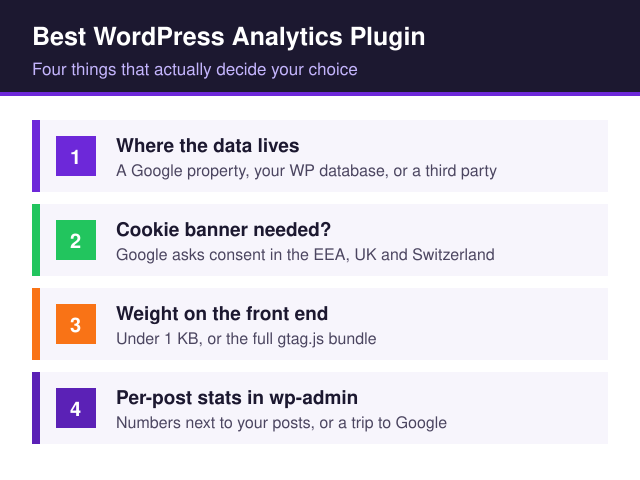
The best WordPress analytics plugin for your site comes down to two questions. Neither one shows up on a feature list: where…

Your contact form is getting submissions — or so you hope. But without tracking, you have no idea which traffic source sent…
Pick a track — from first setup to growing your traffic.

After 8+ years helping businesses make sense of their WordPress analytics, I started this site to share what I've learned — minus the jargon.
Whether you're setting up GA4 for the first time or looking for a privacy-friendly alternative, I write the guides I wish I'd had when I started.
Read my story →