The best WordPress analytics plugin comes down to two questions no feature list answers: where your data lives, and whether you need a cookie banner.
Here’s the short version, matched to what you need most:
- Free Google data inside wp-admin: Site Kit by Google.
- GA4 eCommerce and form reports without code: MonsterInsights, or ExactMetrics from the same company.
- GA4 numbers for each post, right in the editor: Analytify.
- No Google and no cookies at all: Independent Analytics or WP Statistics.
- The lightest tracker you can get: Koko Analytics.
- A live visit log and click data for free: Slimstat.
- Self-hosted stats with WooCommerce revenue on a paid plan: Burst Statistics.
- Full ownership with room to grow: Matomo for WordPress, if your hosting can carry it.
- Zero setup on any host: Jetpack Stats.
Below you’ll find a table of all 11 plugins, a short review of each, and a “pick this if” list for five common setups.
What separates the best WordPress analytics plugin from the rest?
Most analytics plugins in the directory do one job. They add Google’s gtag.js to your pages and pull GA4 numbers back into wp-admin.
So comparing their feature bullets mostly means comparing wrappers around the same script.
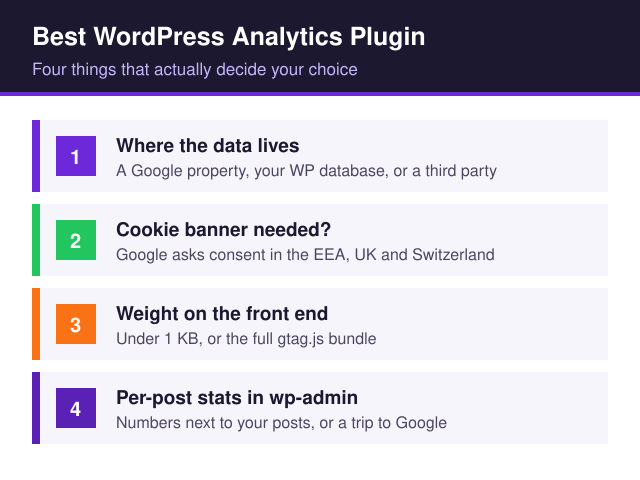
Four things really do differ, and you’ll feel each one later:
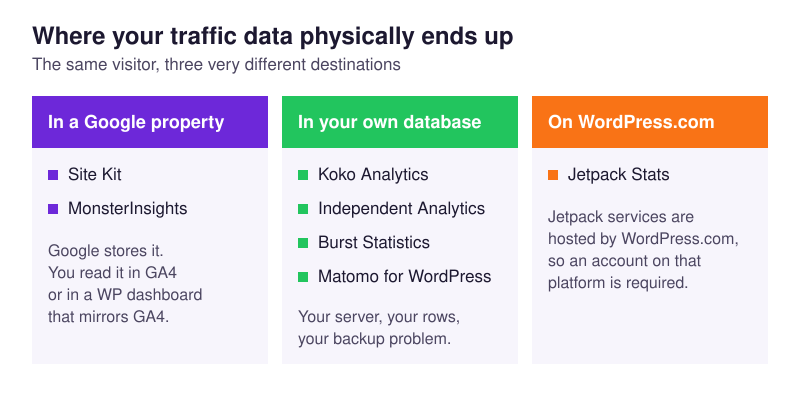
- Where the data lives. It sits in a Google Analytics property, in your own WordPress database, or on a third party’s servers. That decides who can delete your history and what you keep after you cancel.
- The consent footprint. Some plugins put you in cookie banner territory the moment you activate them. Others never set a cookie.
- Front-end weight. The tracker loads on every page view, so its size is a permanent tax on your Core Web Vitals.
- Per-post reporting. Some plugins show numbers next to your posts in wp-admin. Others send you to Google’s interface every single time.
Heatmaps, funnels and live counters are extras you can add later. Pick a data model first and a feature set second.
How do the main WordPress analytics plugins compare?
Eleven plugins cover almost every realistic setup, so your best pick is very likely in this table.
Prices come from each vendor’s own pricing page and were checked while writing this. First-year discounts are common, so look at the renewal price before you pay.
| Plugin | Where data lives | Free tier | Paid from | Cookie banner needed? | Front-end weight | Per-post stats in wp-admin |
|---|---|---|---|---|---|---|
| Site Kit by Google | Your GA4 property | Everything, free | Free | Yes, in the EEA, UK and Switzerland | Full gtag.js bundle |
Admin-bar tab for the current URL |
| MonsterInsights | Your GA4 property | Lite (basic reports) | Plus $99.50 first year, then $199. eCommerce and forms from Pro | Yes, in the EEA, UK and Switzerland | gtag.js plus plugin script |
GA4 reports mirrored in wp-admin |
| ExactMetrics | Your GA4 property | Lite (basic reports) | Plus $99.50 first year, then $199. eCommerce and forms from Pro | Yes, in the EEA, UK and Switzerland | gtag.js plus plugin script |
GA4 reports mirrored in wp-admin |
| Analytify | Your GA4 property | Dashboard, per-post stats, Search Console | $99 a year for 2 sites | Yes, in the EEA, UK and Switzerland | gtag.js, can be served from your domain |
Yes, inside the post editor |
| Independent Analytics | Your WordPress database | Unlimited sites, unlimited views | Pro $49 a year (1 site) | No, no cookies | No external scripts | Yes, view counts in the Posts list |
| WP Statistics | Your WordPress database | Unlimited views, core reports | Premium $119 a year (1 site) | No, no cookies | First-party tracker, no size published | Popular posts and per-page reports |
| Koko Analytics | Your WordPress database | Full core plugin | Pro €59 a year (1 site) | No, cookies are optional | “Less than 1 kilobyte” | Dashboard with top posts |
| Slimstat | Your WordPress database | Live log, click counts, 1 goal | Pro $49 a year (1 site) | Not with its cookie switched off (on by default) | First-party tracker, no size published | Admin-bar stats and full reports |
| Burst Statistics | Your WordPress database | Core plugin, unlimited pageviews | Creator $49 a year, Business $99 (1 site) | Not in cookieless mode (cookies are the default) | “Under 4 KB” | Page-level stats for every URL |
| Matomo for WordPress | Your WordPress database | Yes, self-hosted | Matomo Cloud from $26 a month (50,000 hits) | Not if you disable cookies | Self-hosted Matomo tracker | Full Matomo reports in wp-admin |
| Jetpack Stats | WordPress.com servers | Any site, any traffic | $8.33 a month billed yearly, 10K views a month | Depends on your setup | Jetpack’s own script | Stats screen in wp-admin |
Read the table by group and a pattern shows up. The four Google plugins put your data in a property you don’t fully control.
The database plugins are cheap or free, weigh less, and mostly skip the consent problem. They only ever know about your own site, though.
For a deeper look at the two biggest Google options, see the full MonsterInsights vs Site Kit comparison.
The 11 WordPress analytics plugins, reviewed
Each review covers who the plugin suits, what it does well, what it costs, and where it falls short.
Site Kit by Google
Site Kit suits you if GA4 already runs and you want Google’s own numbers in wp-admin for nothing.
- Brings Analytics, Search Console, AdSense and PageSpeed Insights into one plugin.
- Places the GA4 tag for you, so there’s no code to paste.
- Can show stats for the page you’re viewing in the WordPress toolbar.
- Google maintains it, and wordpress.org lists 5 million+ active installs.
Price: free. Its plugin page says it “is free and open source, and will remain so.”
Watch out: it reports Google’s data only, and the tag needs consent in the EEA, UK and Switzerland.
MonsterInsights
MonsterInsights suits stores and lead-gen sites that want GA4 eCommerce and form reports without touching any code.
- Mirrors your GA4 reports inside wp-admin, with no tracking code to edit.
- Enhanced eCommerce tracking for WooCommerce on the Pro plan.
- Form conversion tracking, also on Pro.
- The free Lite version has 2 million+ active installs on wordpress.org.
Price: Lite is free. On the MonsterInsights pricing page, Plus is $99.50 for the first year and $199 after. Pro is $199.50, then $399.
Watch out: Lite stops at basic reports, and Site Kit covers those for free.
ExactMetrics
ExactMetrics suits you if you like the MonsterInsights approach and want to compare a second plan list.
- GA4 reports inside WordPress, set up without code.
- A real-time dashboard and an EU compliance add-on from the Plus plan.
- eCommerce, form conversion and custom dimension tracking on Pro.
- 200,000+ active installs on wordpress.org.
It started life as Google Analytics Dashboard for WordPress. Today its site footer reads “ExactMetrics is a trademark of MonsterInsights, LLC.”
Price: the Lite version costs nothing. On the ExactMetrics pricing page, Plus is $99.50 for the first year, then $199. Pro is $199.50, then $399.
Watch out: plans and prices match MonsterInsights, so switching between the two won’t save you money.
Analytify
Analytify suits bloggers who want GA4 numbers for each post right where they edit it.
- Views, users, bounce rate and time on page for any post, shown in the editor.
- Search Console queries, clicks and click-through rate next to your Analytics data.
- Can serve Google Analytics from your own domain, so ad blockers stop fewer hits.
- Built-in support for CookieYes and Google Consent Mode v2.
Price: the core plugin is free. The Analytify pricing page starts Pro at $99 a year for two sites, with WooCommerce and form tracking included.
Watch out: you still need a Google Analytics account, and real-time reports only come with Pro.
Independent Analytics
Independent Analytics suits writers who want view counts beside each post and no Google property at all.
- View counts sit right in the Posts list, so you check results while you work.
- “No cookies” and “no communication with external servers,” as its plugin page puts it.
- The free version tracks unlimited views on as many sites as you like.
- Pro adds a real-time dashboard, form tracking, WooCommerce sales and email reports.
Price: free core. The Independent Analytics pricing page lists Pro at $49 a year for one site and Agency at $199 for unlimited sites.
Watch out: it sees your own site only, so Google Ads conversions still need GA4.
WP Statistics
WP Statistics suits site owners who want a full stats suite in wp-admin with no cookies and no outside account.
- Popular posts, pages, categories and tags, plus bounce rate for each entry page.
- Live online visitors and five referral reports, including search engines and social media.
- Country, city and device reports, with email reports built in.
- Its plugin page says plainly, “We do not use cookies,” and data stays on your server.
It’s one of the most installed options here, with 500,000+ active installs on wordpress.org.
Price: free core with unlimited views. The WP Statistics pricing page starts Premium at $119 a year for one site.
Watch out: custom post types, Search Console, outbound links and downloads all need paid add-ons.
Koko Analytics
Koko Analytics suits personal blogs and small sites where speed matters more than deep reports.
- Adds “less than 1 kilobyte of data” to your pages, according to its plugin page.
- Works with any caching setup and skips WordPress entirely when it collects a hit.
- Cookies are optional, so you can run it without a banner.
- Open source under the GPL, with a dashboard of top pages and referrers.
Price: Koko’s core is free. The Koko Analytics pricing page lists Pro at €59 a year for one site.
Watch out: country, browser and device reports only arrive with Pro.
Slimstat
Slimstat suits hands-on owners who want a live log of every visit and click data without paying.
- A real-time access log that shows each pageview as it lands.
- Click counts per page, plus your top channels and campaigns, in the free version.
- A WooCommerce revenue dashboard beside your traffic (WooCommerce 8.3 or newer).
- Data stays in your WordPress database, “full stop,” as its FAQ puts it.
It comes from VeronaLabs, the team behind WP Statistics, and has 70,000+ active installs.
Price: the free version includes one goal. The Slimstat pricing page lists Pro at $49 a year for one site, with full heatmaps, five goals and three funnels.
Watch out: it sets a tracking cookie until you switch that off and turn on IP hashing.
Burst Statistics
Burst suits business sites that want self-hosted stats now and WooCommerce revenue reports later.
- “A tiny tracking script under 4 KB,” according to its plugin page.
- Top pages and posts, with visitors, sessions, pageviews and bounce rate for each one.
- Goals, custom events and Search Console data in the same dashboard.
- The Business plan adds WooCommerce sales, cart abandonment and average order value.
Price: no charge for the core plugin. The Burst pricing page lists Creator at $49 a year and Business at $99, both for one site.
Watch out: cookies are on by default “because they’re more accurate,” so switch on cookieless mode yourself.
Matomo for WordPress
Matomo for WordPress suits you if you want a full analytics platform with every row in your own database.
- Full Matomo reports inside wp-admin, with the data kept in your own database.
- Cookieless tracking through one documented setting.
- Needs at least 128 MB of PHP memory, and its plugin page recommends 256M.
- From Matomo 6, it will need PHP 8.1 and MySQL 8.0 or MariaDB 10.6.
Price: the Matomo plugin is free. If you’d rather not host it, Matomo Cloud starts at $26 a month for 50,000 hits.
Watch out: for busy sites and big multisite networks, Matomo itself points you to its On-Premise or Cloud versions.
Jetpack Stats
Jetpack Stats suits anyone who wants simple numbers today without setting up anything on the server.
- Free for “any type of site, any amount of traffic,” with your full history kept.
- A stats screen in wp-admin with top posts, pages and referrers.
- The paid tier adds UTM tracking, device stats, and region and city locations.
- Made by Automattic, the company behind WordPress.com.
Price: free. On the Jetpack Stats page, paid starts at $8.33 a month, billed yearly, for 10K views a month.
Watch out: your data lives on WordPress.com servers. Older guides also still claim the free tier is for personal sites only.
Looking for a MonsterInsights alternative?
Most people leave MonsterInsights for one of three reasons. Here’s where each one leads you.
- The price. Site Kit gives you GA4 dashboards for free. Analytify includes WooCommerce and form tracking from its $99 plan, where MonsterInsights saves both for Pro.
- The same thing under a new name. ExactMetrics comes from the same company, with the same prices. It isn’t a way to save.
- Google itself. If consent banners hollow out your GA4 data, move to a plugin that keeps stats in your database. Independent Analytics, WP Statistics, Koko Analytics, Slimstat and Burst all qualify.
Deactivate MonsterInsights fully before you set up the replacement. Our guide on removing Google Analytics from WordPress covers a clean exit.
Which plugins force you into a cookie banner?
This question rules out more setups than any pricing page. It matters as soon as your visitors include Europeans.
Google’s EU User Consent Policy requires consent for “the use of cookies or other local storage where legally required.”
That covers the European Economic Area, the UK and Switzerland. Site Kit, MonsterInsights, ExactMetrics and Analytify all load gtag.js, so all four fall under it.
You’ll need a consent tool that blocks the tag until the visitor agrees. Plenty of visitors will never show up in GA4 as a result.
The database plugins avoid most of this by design:
- Independent Analytics and WP Statistics set no cookies at all.
- Koko Analytics makes cookies optional.
- Burst and Slimstat use cookies by default, with a cookieless mode you switch on.
- Matomo drops cookies with one documented line of tracking code.
Matomo adds a careful caveat. If you set it up to process no personal data, “the consent may no longer be required.”
Check that with your own adviser, because the answer depends on where you operate, not on the plugin.
None of this replaces a privacy review. Our guide to GDPR-compliant analytics for WordPress walks through the paperwork.
Curious how much data a banner costs you? Read cookie consent and your traffic data.
What does each plugin cost you in page load?
The tracker runs on every page view, so its weight adds up fast over a month of traffic.
Google’s gtag.js is the heavyweight here. It’s a third-party bundle, and its size changes with how the property is configured.
Site Kit, MonsterInsights, ExactMetrics and Analytify all exist to deliver that script. Analytify can at least serve it from your own domain.
Koko Analytics sits at the other end at “less than 1 kilobyte.” Burst publishes “under 4 KB.”
Independent Analytics, WP Statistics and Slimstat run first-party trackers but don’t publish a byte count.
Matomo’s cost shows up on the server instead. Every visit adds requests, and report archiving works your database on a schedule.
That’s why its plugin page steers high-traffic sites toward Matomo On-Premise or Matomo Cloud.
Read the full Matomo for WordPress walkthrough before you commit a small server to it.
Do you get per-post numbers where you actually write?
Here’s the daily-use question. You publish a post, and a few days later you want to know if anyone read it.
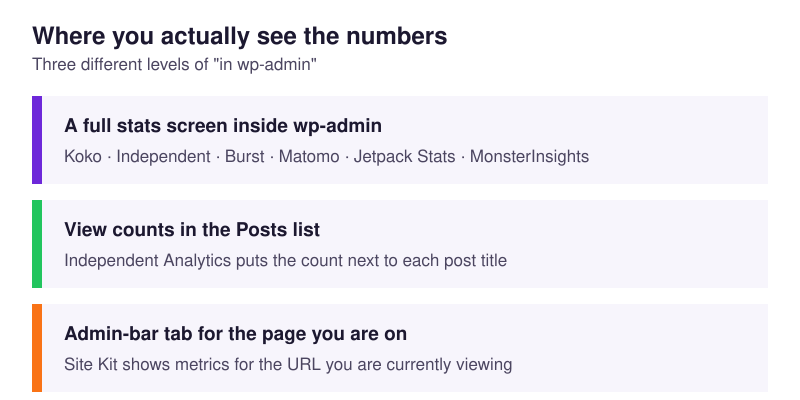
- Independent Analytics: view counts in the Posts list, right beside each title.
- Analytify: GA4 stats for the post inside the editor you wrote it in.
- Burst Statistics and WP Statistics: per-page reports in their own dashboards.
- Koko Analytics, Matomo and Slimstat: a stats screen with your top posts, one click deeper.
- Site Kit: a toolbar tab with figures for whichever URL you’re viewing.
- MonsterInsights, ExactMetrics and Jetpack Stats: their own report screens in wp-admin.
Not sure where to start? Here are eight ways to check website traffic in WordPress, including one with nothing to install.
The per-post column only tells you what already happened. To choose your next topic, use the method to find content ideas from competitor data.
So which is the best WordPress analytics plugin for you?
Five common setups, five answers.
- Personal blog on cheap shared hosting. Koko Analytics. It weighs under a kilobyte, needs no banner and won’t strain an entry-level plan.
- Business site with EU traffic. Independent Analytics or WP Statistics. Neither sets cookies, so your numbers include everyone, not only the people who click “accept.”
- WooCommerce store. MonsterInsights Pro or Analytify for GA4 revenue reports. Burst Business or Slimstat Pro if you’d rather keep sales data on your own server.
- High-traffic magazine. Site Kit plus GA4, because Google absorbs storage that would otherwise flatten your database. Pair it with a consent tool.
- Agency running client sites. Independent Analytics Agency covers unlimited websites for $199 a year.
Notice there’s no universal winner. The best WordPress analytics plugin is the one that fits your hosting, your audience and the way you work.
Can you run two analytics plugins at the same time?
Technically yes. In practice it usually causes more confusion than it solves.
The classic mess is two GA4 plugins at once, say Site Kit plus MonsterInsights. Each pageview fires twice and your bounce rate looks suspiciously good.
One Google plugin beside one database plugin is a different story. The database plugin will count more visitors, because it sees people who declined consent or block ads.
That gap is useful. It shows you exactly how much GA4 is missing.
Already have two GA4 tags? Look for more than one gtag.js in your page source, then deactivate the losing plugin completely.
Starting fresh instead? The no-code GA4 setup walkthrough gets one tag installed properly the first time.
Best WordPress analytics plugin: FAQ
What is the best free WordPress analytics plugin?
Site Kit, if you want Google’s data. If you’d rather skip Google, Independent Analytics, WP Statistics and Koko Analytics all offer a complete free version that stores stats in your own database.
Is Site Kit enough on its own?
For most blogs, yes. It’s free, Google maintains it, and it joins Analytics with Search Console. You’ll outgrow it when you need eCommerce reports or when consent losses thin out GA4.
Will a self-hosted analytics plugin slow my site down?
On the front end, rarely. A small first-party tracker beats Google’s third-party bundle. On the server, Koko, Burst and Independent Analytics stay light, while Matomo will make itself felt on shared hosting.
Do I still need Google Analytics if I use Koko or Independent Analytics?
Only for what they can’t see, such as Google Ads conversions and cross-domain journeys. For which posts get read and where readers come from, a database plugin answers faster. Our Koko Analytics review goes deeper.

Written by Ellie
Former Head of Analytics at a European digital agency. 8+ years making WordPress analytics make sense. I write the guides I wish existed when I started.
More about me →