Two plugins dominate the conversation when WordPress site owners want GA4 data without touching code: MonsterInsights and Google Site Kit. Both connect Google Analytics 4 to your WordPress dashboard. Both have millions of active installs. And both will get the job done — but they’re built for very different users.
If you’ve been comparing MonsterInsights vs Site Kit and can’t figure out which one to install, this breakdown is for you. I’ll cover features, pricing, ease of use, and the honest trade-offs — including the thing neither plugin mentions prominently: you still depend entirely on Google either way.
Quick Comparison: MonsterInsights vs Site Kit
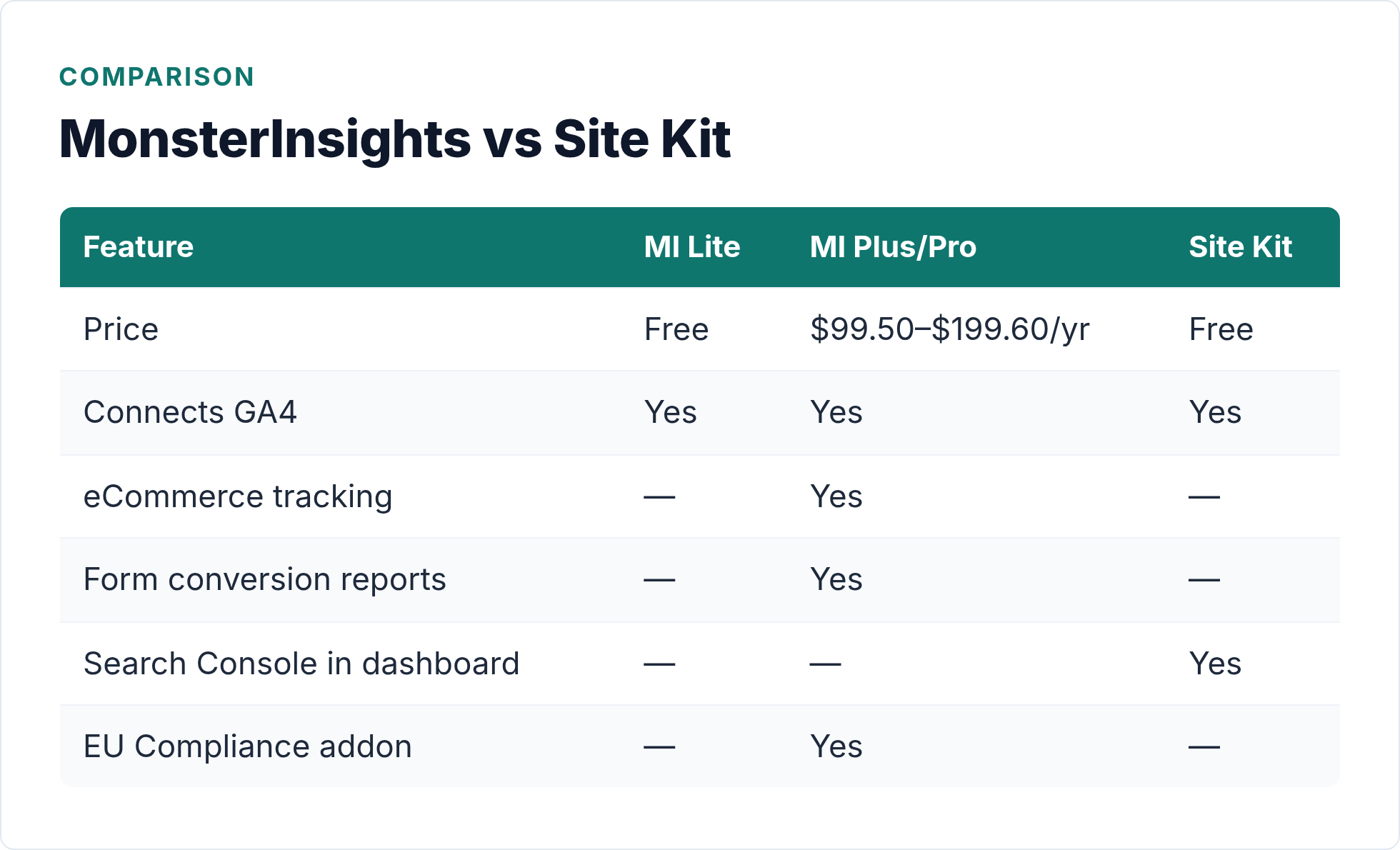
| Feature | MonsterInsights (Lite) | MonsterInsights (Plus/Pro) | Google Site Kit |
|---|---|---|---|
| Price | Free | $99.50–$399.60/year | Free |
| Made by | MonsterInsights (WPBeginner) | MonsterInsights (WPBeginner) | |
| GA4 connection | Yes | Yes | Yes |
| In-dashboard reports | Basic | Advanced | Basic (widget-style) |
| eCommerce tracking | No | Yes (Plus+) | No |
| Form tracking | No | Yes (Plus+) | No |
| Search Console integration | No | No | Yes |
| AdSense & PageSpeed | No | No | Yes |
| EU Compliance addon | No | Yes (Plus+) | No |
| Pro support | No | Yes | Community only |
| Best for | Bloggers, simple sites | eCommerce, agencies | Google tool users, beginners |
Both plugins are connectors — they route GA4 data into WordPress. Neither replaces GA4 or runs its own analytics engine. Keep that in mind as we go deeper.
MonsterInsights Overview
Strengths
MonsterInsights has been around since GA Universal Analytics days, and it shows — in a good way. The plugin is polished, well-documented, and actively maintained. Setup takes about five minutes: install, connect your Google account, and a tracking snippet is live on every page.
The Lite (free) version gives you a clean overview dashboard inside WordPress: sessions, pageviews, bounce rate, top posts, traffic sources. It’s readable at a glance, which is more than you can say for the raw GA4 interface. If you’re the kind of site owner who checks analytics once a week and wants a quick answer, Lite might be all you need.
Where MonsterInsights earns its money is in the paid tiers. Plus at $99.50/year adds eCommerce tracking (WooCommerce and Easy Digital Downloads), form conversion reports, custom dimensions, and — importantly — the EU Compliance addon, which handles GDPR-related consent and opt-out behavior. For any site running WooCommerce, that eCommerce tracking alone justifies the cost if you previously needed to cobble it together manually.
Pro at $199.60/year covers five sites and adds advanced eCommerce reports, coupon performance tracking, and deeper audience insights. Agency at $399.60/year is for 25 sites — agencies managing client portfolios. The per-site cost math works out reasonably well at that scale.
Weaknesses
The free version is limited enough that it functions partly as a product demo. You see enough to want more, but core features — like form tracking and GDPR compliance — require a paid plan. That’s a legitimate business model, but be clear-eyed about it when comparing “free vs free.”
Also, MonsterInsights focuses entirely on GA4. If you want Search Console data, AdSense revenue, or PageSpeed scores alongside your traffic numbers, you’re looking at separate tabs or separate plugins. It solves one problem (GA4 in WordPress) very well, and stops there.
For a broader look at how plugins compare for general GA4 setup, the WordPress analytics easy setup guide runs through the landscape without going deep on any single tool — useful context before committing to a paid plugin.
Google Site Kit Overview
Strengths
Google Site Kit is the official Google plugin, and completely free — no Pro tier, no feature gating. Connect your Google account, grant permissions, and it pulls GA4, Search Console, AdSense, and PageSpeed Insights into a unified WordPress dashboard.
That multi-service view is Site Kit’s real differentiator. Seeing your top organic search queries from Search Console alongside your GA4 traffic data in the same screen is genuinely useful. If you run AdSense, you get revenue data without switching tabs. PageSpeed scores show up in your post list, so you can spot slow pages without running a separate audit.
Setup is straightforward. Google has put real effort into making Site Kit accessible to non-technical users, and it shows. The onboarding wizard walks you through each service connection step by step. Most users have GA4 tracking live within ten minutes.
Weaknesses
Site Kit’s in-dashboard reports are thin. You get summary widgets — top posts, sessions, clicks from search — but not much depth. For anything beyond “how many people visited this week,” you’ll click through to the full GA4 or Search Console interface anyway. So the dashboard value is mostly convenience, not analytical power.
There’s also no eCommerce tracking, no form conversion reports, and no EU Compliance addon. If your site sells things or operates under GDPR, Site Kit doesn’t handle those requirements. You’d need additional plugins to fill those gaps.
Support is community forums only. If something breaks or your GA4 connection drops, you’re in a public thread waiting for a response, not opening a support ticket. For a hobby blog, fine. For a business site, that’s worth factoring in.
Feature-by-Feature Breakdown
GA4 Setup and Tracking Accuracy
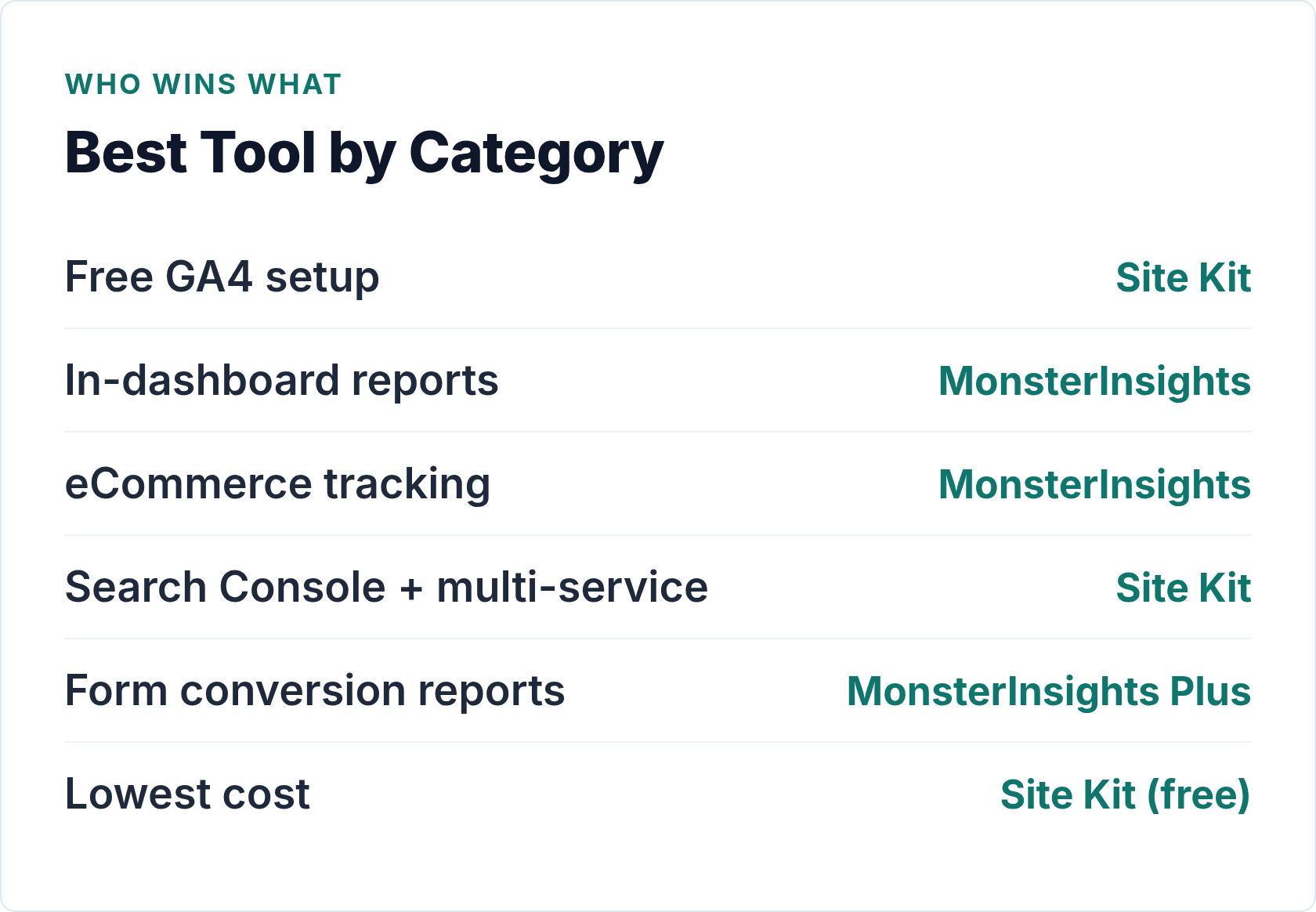
Both plugins inject the GA4 tracking snippet on every WordPress page and handle the Google account authentication. Tracking accuracy is effectively identical — both send the same data to the same GA4 property. Neither plugin improves or alters what GA4 measures.
If you want to understand what GA4 is actually collecting and how to interpret traffic sources in those reports, the guide to reading GA4 traffic sources in WordPress is worth bookmarking alongside whichever plugin you choose.
In-Dashboard Reports
MonsterInsights wins this category. Its overview report is well-designed — traffic trends, top content, device breakdown, referral sources — all readable without leaving WordPress. The paid tiers add audience demographics, real-time stats, and content analytics that go beyond what Site Kit shows.
Site Kit’s dashboard is more of a widget collection. Useful for a quick temperature check; not a substitute for opening GA4 when you need to dig into something.
eCommerce and Conversion Tracking
MonsterInsights Plus and above include automatic WooCommerce tracking — revenue, transactions, conversion rate — without writing a line of code. It also tracks form submissions from Contact Form 7, WPForms, and similar plugins as key events (formerly called conversions in GA4; the label changed in March 2024).
Site Kit has none of this. If you run an online store or want form conversion data, Site Kit is not the right tool.
Multi-Service Integration
This is where Site Kit pulls ahead. Connecting Search Console alone is worth installing it for — seeing which queries bring organic visitors is data MonsterInsights simply doesn’t surface. Add AdSense and PageSpeed, and Site Kit becomes a lightweight command center for your Google ecosystem.
For a pure GA4-in-WordPress use case, MonsterInsights. For a broader view of Google tools in one place, Site Kit has no competition.
Privacy and GDPR Compliance
Neither plugin is a complete GDPR solution on its own — you still need a cookie consent tool regardless. However, MonsterInsights Plus includes the EU Compliance addon, which implements GA4’s consent mode, anonymizes IPs, disables cookies for non-consenting visitors, and provides an opt-out mechanism.
Site Kit relies on GA4’s built-in Consent Mode v2, which you configure separately. It works, but requires more manual setup and a compatible Consent Management Platform. For EU-focused sites without a developer, MonsterInsights Plus reduces that friction considerably.
Pricing Comparison
This is where the decision gets concrete. Site Kit is free, full stop. No paid tier, no premium features. What you see is what you get.
MonsterInsights Lite is also free, but with visible limitations. The upgrade path:
- Plus — $99.50/year (1 site): eCommerce tracking, form reports, custom dimensions, EU Compliance addon, priority support
- Pro — $199.60/year (5 sites): adds advanced eCommerce, coupon reports, deeper audience data
- Agency — $399.60/year (25 sites): for managing multiple client sites
If you run a content blog with no store and no pressing GDPR concerns, MonsterInsights Lite and Site Kit are both legitimate free options. The paid MonsterInsights tiers are worth it specifically for WooCommerce operators, EU-market sites that need compliance tools out of the box, or agencies managing multiple client installs.
Paying $99.50/year for eCommerce tracking that would otherwise require a developer is often good value. Paying $99.50/year just for a cleaner dashboard than Site Kit is less obviously justified.
Setup Experience
Both plugins are beginner-friendly. The honest answer is that Site Kit’s onboarding is slightly smoother because it was designed from the ground up with non-technical users in mind — the Google-designed wizard is clear and handles authentication cleanly.
MonsterInsights Lite’s setup is also quick, but the dashboard occasionally nudges you toward upgrading, which some users find distracting during initial setup.
If you want a no-code GA4 setup guide that works with either plugin, setting up GA4 with WordPress plugins walks through the authentication and verification steps in detail.
The Part Neither Plugin Talks About
One point deserves stating plainly: both plugins depend entirely on GA4 and Google. They’re wrappers around the same tracking technology, pointed at the same Google servers, with the same data limitations.
If GA4 changes its data model (it has, repeatedly), both plugins update to match. If Google decides to deprecate a feature or change consent requirements, both plugins respond to that. If you have EU visitors and want truly cookie-free analytics, neither plugin solves that — they both add Google tracking cookies and route data to US servers.
For anyone who’s evaluated the Google dependency question and decided GA4 is worth the trade-off, that’s a perfectly reasonable choice. But if you’re looking for a plugin that makes analytics independent of Google, neither MonsterInsights nor Site Kit is the answer. For that, look at Koko Analytics, a lightweight alternative that keeps tracking local or a privacy-first alternative like Plausible or Matomo.
The Verdict: Which Should You Choose?
Choose MonsterInsights if:
- You run WooCommerce or Easy Digital Downloads and want automatic eCommerce tracking without developer setup
- You need GDPR-compliant analytics with an EU Compliance addon that handles consent and opt-out
- You want form conversion tracking (Contact Form 7, WPForms, etc.) surfaced in WordPress without writing custom GA4 events
- You manage multiple sites and the per-site cost at Pro or Agency tier makes sense
- You want priority email support when something breaks
Choose Site Kit if:
- You want GA4 connected to WordPress for free, with no plans to pay for analytics tooling
- You use Search Console and want organic query data alongside your GA4 numbers in the same screen
- You run AdSense and want revenue data without a separate login
- You want PageSpeed scores visible inside WordPress without a separate audit tool
- You’re a beginner and the Google-designed onboarding experience feels more trustworthy
Use both if you want to. They don’t conflict in any meaningful way, though running two GA4 tracking snippets will double-count your pageviews — use one for tracking, the other for reporting if you go this route. Most people don’t need both.
Which One Should You Install?
For free-tier use, Site Kit edges ahead because of the Search Console integration — that organic query data is genuinely useful for content sites, and MonsterInsights Lite doesn’t offer it. If you only want GA4 numbers in your dashboard and nothing else, either works equally well at zero cost.
MonsterInsights becomes the right choice the moment you need eCommerce tracking, form conversions, or GDPR compliance tooling built in. At $99.50/year for Plus, it’s a reasonable price if those features matter to you. If they don’t, there’s no compelling reason to pay for what the free options already cover.
Either way, remember: you’re investing in better access to data you already collect via GA4. The analytics engine is Google’s, the data lives in Google’s infrastructure, and the reports ultimately live in GA4. These plugins make that data more accessible inside WordPress — which is genuinely useful. Just know what you’re buying.

Written by Ellie
Former Head of Analytics at a European digital agency. 8+ years making WordPress analytics make sense. Google Analytics certified. I write the guides I wish existed when I started.
More about me →