Google Analytics is the default for most WordPress sites. But it’s not the only option — and for some sites, it’s not even the right one. Matomo for WordPress gives you a full-featured analytics platform that lives on your own server, stores no data in third-party hands, and can run without cookies entirely. If data ownership and GDPR compliance matter to your setup, it’s worth a serious look.
This guide covers what Matomo actually is, how the WordPress plugin differs from Matomo Cloud, how to install and connect it, which privacy settings to enable, and whether it makes sense for your site — or whether something simpler will do.
What Is Matomo?
Matomo is an open-source web analytics platform. It started life as Piwik in 2007 and was rebranded to Matomo in 2018. Today, it’s the most full-featured privacy-respecting analytics alternative to Google Analytics — used by governments, universities, and businesses that need GA4-level depth without handing their visitor data to Google.
The core idea: you control the data. Matomo runs on your infrastructure, writes to your database, and doesn’t share anything with anyone unless you configure it to. It tracks pageviews, sessions, referrers, goals, funnels, search keywords, and much more. Advanced features like heatmaps and A/B testing are available as paid add-ons.
There are two ways to use it on a WordPress site: the Matomo WordPress plugin (self-hosted, embedded inside WP) or Matomo Cloud (hosted by Matomo on their servers). They’re different products with different trade-offs, which we’ll cover below.
Matomo WordPress Plugin vs Matomo Cloud
This is the first decision you’ll make, and it matters more than it might seem.
The WordPress Plugin (Self-Hosted Inside WP)
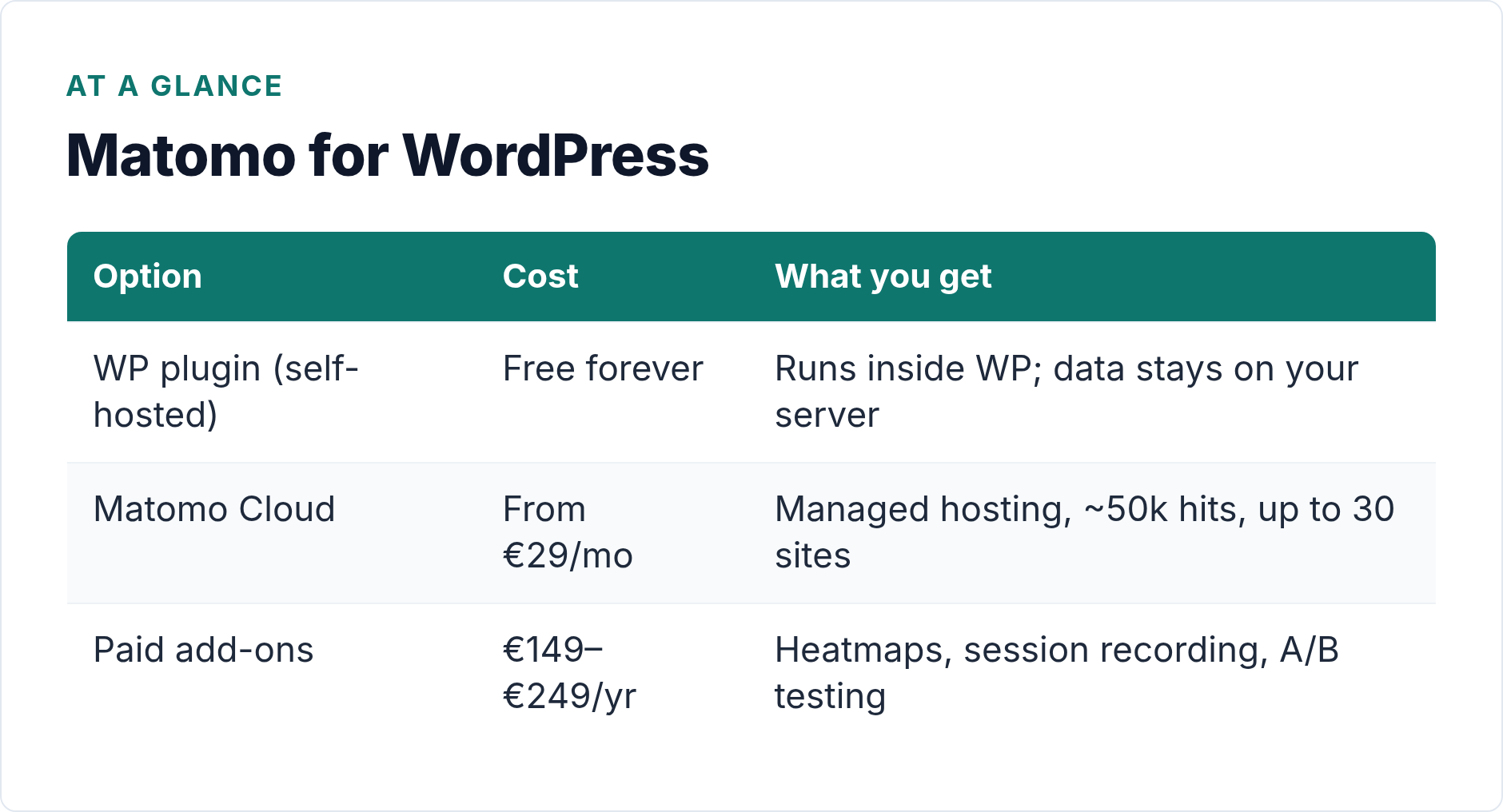
The Matomo Analytics WordPress plugin installs Matomo directly inside your WordPress install. It uses your existing WordPress database and runs entirely on your server. No separate Matomo instance to configure. No separate database. Just install, activate, and your data starts flowing — all of it staying on your server.
This version is free forever. There’s no pageview cap, no expiry, no locked-behind-paywall essentials. You can run it indefinitely on as many WordPress sites as you want without paying anything for the core platform.
The trade-off is server load. Matomo is not lightweight. Every pageview hits your PHP stack to record tracking data. On a shared host with limited resources, this can slow things down noticeably at scale.
Matomo Cloud
Matomo Cloud is a fully hosted version run by the Matomo team. You don’t install anything on your server — you connect your WordPress site to a Matomo-hosted instance via their tracking code. Starts at €29/month (Starter plan, up to approximately 50,000 hits per month, up to 30 sites).
The upside: your server doesn’t do the analytics processing. The downside: you’re now sending visitor data to an external server, even if it’s Matomo’s. For strict data sovereignty requirements, that’s a relevant distinction. For most sites, it’s fine — Matomo’s servers are EU-based and GDPR compliant.
| Feature | WP Plugin (Self-Hosted) | Matomo Cloud |
|---|---|---|
| Cost | Free forever | From €29/month |
| Data location | Your server | Matomo’s EU servers |
| Setup complexity | Low (plugin install) | Low (tracking code) |
| Server impact | Medium–high | None |
| Maintenance | Plugin updates (you) | Managed by Matomo |
| Add-ons included | Paid separately | Some included by plan |
How to Install the Matomo WordPress Plugin
Setup takes about ten minutes. Here’s the straightforward path.
- In your WordPress admin, go to Plugins → Add New and search for “Matomo Analytics.”
- Install and activate the plugin by Innocraft (Matomo’s company).
- A new Analytics menu item appears in your WP sidebar. Click it.
- Matomo runs an automatic setup: it creates its tracking tables in your WP database and starts collecting data immediately.
- Within 24 hours, your first reports populate. You’ll see pageviews, referrers, countries, devices, and more.
No API keys. No external account to create. No tracking code to manually paste into your theme. The plugin handles all of that internally, which is one of its genuine advantages over most analytics tools.
If you’re connecting to Matomo Cloud instead, the plugin also supports this: you enter your Matomo Cloud URL and site ID, and the plugin manages the tracking code injection. You don’t need two separate setups.
> Note: After install, go to Analytics → Settings in your WP admin to configure privacy options before your data accumulates. It’s much easier to start right than to retroactively clean up months of non-compliant data.
Privacy Configuration: The Settings That Actually Matter
This is where Matomo earns its reputation. Most analytics tools are privacy-unfriendly by default; you have to work to make them compliant. Matomo is the opposite. The privacy controls are built in, and you can enable them in a few clicks.
Cookieless Tracking
By default, Matomo uses a first-party cookie to recognize returning visitors. This is more accurate than cookieless mode, but it means you technically need consent if your site has EU visitors — analytics cookies are non-essential under the ePrivacy Directive.
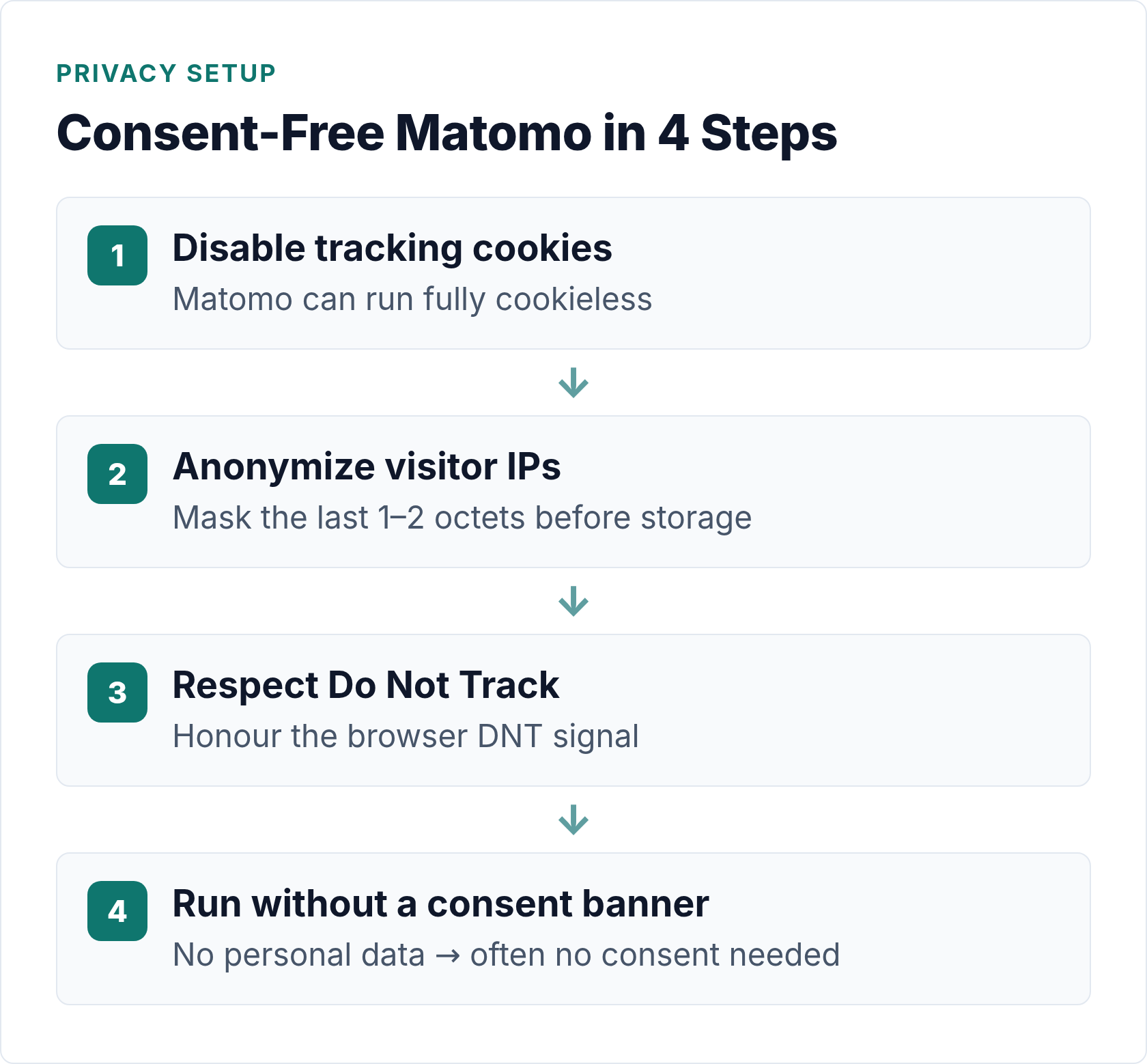
To remove cookies entirely: go to Analytics → Privacy → Anonymize Data and disable cookie tracking. Matomo then identifies sessions using a daily hash of the visitor’s IP + User-Agent (similar to how Plausible works). You lose some returning-visitor accuracy, but you gain the ability to run without a consent banner. If you want to understand the full picture of how cookieless tracking works across different tools, there’s a deeper breakdown in this guide to analytics without cookies.
IP Anonymization
IP addresses are personal data under GDPR. Matomo can anonymize them automatically by masking the last octet (e.g., `192.168.1.0` instead of `192.168.1.42`) or masking two octets for extra caution. Enable this at Analytics → Privacy → Anonymize Data → Anonymize visitors’ IP addresses.
This is the minimum you should do if your site has EU visitors. The GDPR Article 4 definition of personal data includes IP addresses that could reasonably identify a person — anonymizing removes that risk.
Respect Do Not Track
Matomo can honor the browser’s Do Not Track (DNT) header. Enable it under Analytics → Privacy. This is increasingly considered basic courtesy even where it’s not legally required.
No-Consent Configuration
If you enable both cookieless tracking and IP anonymization, you can configure Matomo to run without a consent banner at all — because you’re no longer processing personal data. This is the “consent-free analytics” setup that privacy-first WordPress site owners often want. The Matomo documentation covers the legitimate interest basis in detail.
That said: this is not legal advice. GDPR applicability depends on your specific situation, where your visitors are, and how your Data Processing Agreements are structured. Check with a legal professional if you’re uncertain.
Paid Add-Ons: What They Cost
The core Matomo WordPress plugin is free. But Matomo’s advanced features are separate paid add-ons, priced annually. These apply to the self-hosted version; some are included in Matomo Cloud plans.
| Add-On | Annual Price | What It Does |
|---|---|---|
| Heatmaps | €199/yr | Visual click, scroll, and move maps per page |
| Session Recording | €149/yr | Record individual visitor sessions for playback |
| A/B Testing | €249/yr | Split-test pages, headlines, CTAs within Matomo |
| Funnels | €149/yr | Multi-step conversion funnels |
| Form Analytics | €149/yr | Field-level form interaction tracking |
| Media Analytics | €149/yr | Video/audio play, completion, and engagement |
These add up fast. If you need heatmaps plus session recording plus funnels, you’re looking at nearly €500/year — on top of hosting your own server. For many sites, that tips the math toward a purpose-built SaaS tool instead. However, if you only need the core analytics (pageviews, referrers, goals, geographic data, device data), the free plugin covers it all.
Matomo vs GA4: Honest Trade-Offs
Matomo and GA4 are genuinely different products that reflect different philosophies. Neither is objectively better — it depends what you need.
| Feature | Matomo (WP Plugin) | GA4 |
|---|---|---|
| Cost | Free (core) | Free |
| Data ownership | 100% yours, on your server | Google’s servers |
| Cookieless mode | Yes (built in) | No (Consent Mode still uses cookies) |
| GDPR compliance | Easier without consent if configured right | Requires consent + Consent Mode v2 |
| Data sampling | No sampling (your data, all rows) | Sampling in free tier above thresholds |
| Ecommerce tracking | Built in (free) | Built in (free) |
| Heatmaps | €199/yr add-on | Not built in (needs separate tool) |
| AI / predictive features | None | Yes (predictive audiences, anomaly detection) |
| Server load | Medium–high on your host | None (external) |
| Learning curve | Medium | High |
| Google Ads integration | None (manual workarounds) | Native |
| Data retention | Unlimited (your storage) | 14 months (default) |
One point worth emphasizing: Matomo never samples your data. GA4 applies sampling in the free tier once you hit certain query thresholds. If you’re making decisions based on reports that cover a sampled percentage of your actual traffic, that’s worth knowing. Matomo always shows you the full picture.
On the other hand, if you run Google Ads, GA4’s native integration is hard to replicate with Matomo. There are workarounds, but they require manual effort and custom tracking code. For paid search, GA4 wins on integration depth.
Who Should Use Matomo for WordPress
Matomo makes the most sense for specific situations, not as a universal recommendation.
Use Matomo if:
- You’re in a regulated industry (healthcare, finance, legal) where data must stay on your infrastructure
- You serve EU visitors and want analytics that genuinely works without a consent banner
- You need full, unsampled data for compliance, reporting, or auditing purposes
- You want a long-term data archive without GA4’s 14-month retention cap
- You need ecommerce analytics without paying for a premium plugin
- Your site gets 10,000+ monthly visits and you want traffic data you can actually trust
I’ve set this up on sites where the client couldn’t send any data to Google — specifically healthcare-adjacent content sites with strict data handling requirements. Matomo was the obvious answer. The setup took about 30 minutes, the reporting covers everything they needed, and no consent banner was required after enabling cookieless mode and IP anonymization.
Who Should Skip It
Matomo isn’t the right tool for everyone. Skip it if:
- Your host is shared or resource-constrained. Matomo adds real server load. On cheap shared hosting, expect slower page loads and database strain at scale.
- You run Google Ads and need conversion tracking. The GA4 + Google Ads integration is simply easier and more reliable. Matomo can’t replicate that natively.
- You just want basic traffic numbers. If all you care about is which posts get views and where visitors come from, Koko Analytics is free, lighter, and requires zero configuration. Matomo is overkill for simple pageview counting.
- You’re not prepared to maintain it. Self-hosted means plugin updates, database growth management, and occasional debugging. It’s not high-maintenance, but it’s not zero-maintenance either.
- You want the simplest possible privacy-friendly analytics. Tools like Plausible or Fathom are fully hosted, have clean dashboards, and handle GDPR compliance for you. Less control, but far less friction.
For a broader look at plugin options across different use cases — including simpler setups that require less technical overhead — the WordPress analytics plugins overview is a good comparison starting point.
Bottom Line
Matomo for WordPress is the most powerful privacy-first analytics option you can self-host. The free WordPress plugin gives you full-featured analytics — goals, referrers, geographic data, device breakdown, and unsampled reports — with data that never leaves your server. Configure cookieless mode and IP anonymization, and you can run it without a consent banner for EU visitors.
The catches are real: server load, paid add-ons for heatmaps and advanced features, no Google Ads integration, and ongoing maintenance responsibility. It’s a serious tool that suits serious data ownership requirements. If that’s your situation, it’s worth the setup time. If you need something lighter, start with Koko Analytics or a hosted privacy tool instead.
Matomo won’t simplify your analytics life. But it gives you complete control over your data — and for the right site, that’s exactly the point.

Written by Ellie
Former Head of Analytics at a European digital agency. 8+ years making WordPress analytics make sense. Google Analytics certified. I write the guides I wish existed when I started.
More about me →