You added a cookie consent banner to your WordPress site and overnight your GA4 traffic dropped 30%. Your content didn’t get worse. Your SEO didn’t tank. You simply lost tracking permission. That’s what cookie consent analytics really means in practice — and it’s a problem every WordPress site owner needs to understand.
However, the situation isn’t hopeless. Once you understand why cookie consent affects your analytics data, you can take concrete steps to close the gap between real visitors and reported numbers. Let’s break it down.
Why Cookie Consent Changes Your Analytics Numbers
Before cookie consent banners existed, Google Analytics tracked every visitor automatically. A cookie was set the moment someone landed on your site — no questions asked. As a result, your traffic numbers were close to complete.
Then came the GDPR in 2018 and the ePrivacy Directive. These regulations require websites to get explicit consent before placing non-essential cookies — and analytics cookies count as non-essential. Therefore, if a visitor clicks “reject” or simply ignores your consent banner, GA4 never fires. That visitor is invisible to your reports.
In other words, your cookie consent analytics gap is the difference between people who actually visit your site and people who give you permission to track them. For most WordPress sites, that gap is significant.
How Much Data Are You Actually Losing?
Consent rates vary widely depending on your audience, region, and how your banner is designed. Here are typical benchmarks based on industry data from Cookiebot:
| Region / Factor | Typical Consent Rate | Data Loss |
|---|---|---|
| United States | 75–85% | 15–25% |
| Western Europe (GDPR) | 50–70% | 30–50% |
| Germany / France | 40–55% | 45–60% |
| Tech-savvy audiences | 35–50% | 50–65% |
| E-commerce sites | 70–80% | 20–30% |
| Blog / content sites | 55–65% | 35–45% |
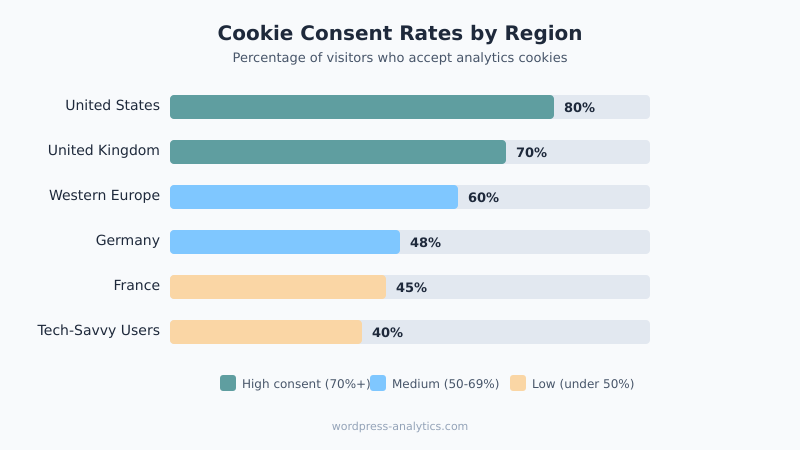
Consequently, if your WordPress site targets a European audience, you could be missing nearly half your traffic in Google Analytics. That’s not a rounding error — it’s a blind spot that can lead to bad content decisions.
How Cookie Consent Affects GA4 on WordPress
When you install a consent management platform (CMP) like CookieYes, Complianz, or Osano on your WordPress site, the flow changes dramatically. Specifically, here’s what happens:
Before consent is given: No analytics cookies are set. GA4 doesn’t load or loads in a restricted state. The visitor exists, but your analytics don’t know about them. As a result, pageviews, sessions, and user counts are all undercounted.
After consent is given: GA4 fires normally. Cookies are set and the visitor appears in your reports. However, any pages they viewed before consenting may still be missing from the data.
Cookie Consent Analytics and Consent Mode v2
Google introduced Consent Mode v2 specifically to address this problem. It has two levels:
- Basic Consent Mode: GA4 tags only fire after consent. No data collection happens before that. This is the simplest approach but gives you the biggest data gap.
- Advanced Consent Mode: GA4 sends cookieless “pings” even without consent. These pings contain no personal data but let Google model the behavior of non-consenting users. As a result, your reports include estimated data alongside actual data.
For WordPress sites, implementing Consent Mode v2 typically requires either a GA4 plugin like Site Kit or MonsterInsights that supports consent integration, or manual configuration through Google Tag Manager.
The Gap Between Real Traffic and Reported Traffic
Let’s make this concrete. Suppose your WordPress blog gets 10,000 actual visitors per month. Here’s what your GA4 dashboard might show depending on your consent setup:
| Scenario | Reported Users | Missing Data |
|---|---|---|
| No consent banner (non-compliant) | ~9,800 | ~2% |
| Basic Consent Mode (EU traffic) | ~6,500 | ~35% |
| Advanced Consent Mode + modeling | ~8,500 (estimated) | ~15% uncertainty |
| Cookieless analytics tool | ~9,700 | ~3% |
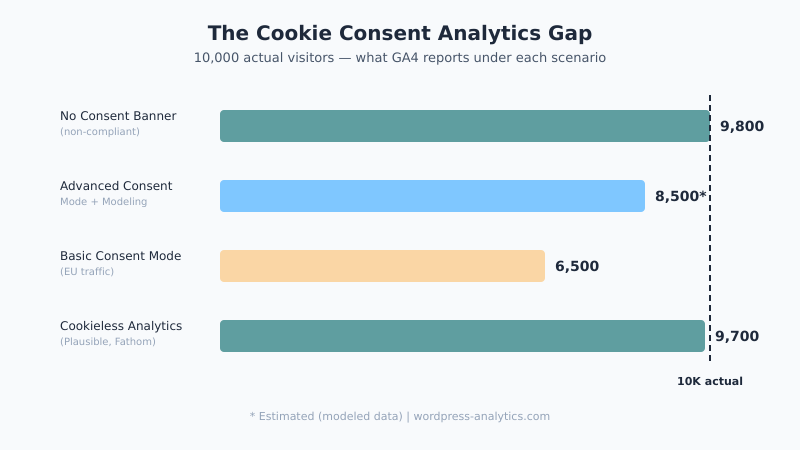
The difference between 6,500 and 10,000 is massive. Moreover, the gap doesn’t just affect total user counts. It distorts everything: your bounce rates, conversion rates, traffic source attribution, and content performance rankings. Essentially, you’re making decisions based on data that represents only a fraction of your actual audience.
Three Ways to Close the Cookie Consent Analytics Gap
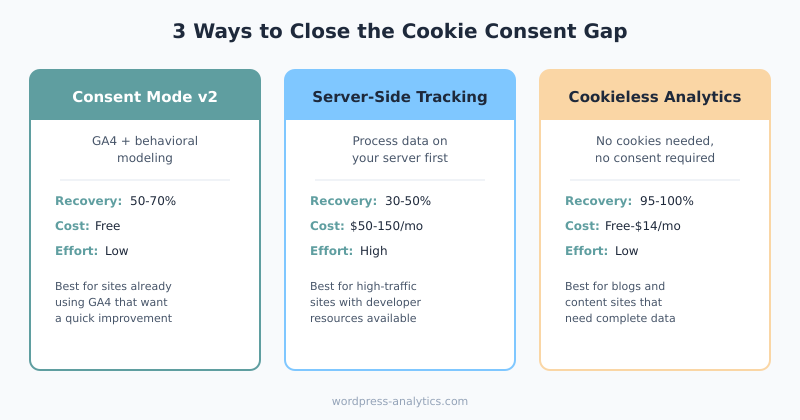
You have three realistic options, each with different trade-offs. Let’s look at them honestly.
GA4 Consent Mode with Behavioral Modeling
This is Google’s answer to the consent problem. When you enable Advanced Consent Mode, GA4 collects limited, cookieless signals from non-consenting users. Then Google’s machine learning models estimate the full picture.
Pros:
- Stays within the GA4 ecosystem — no new tools needed
- Free to implement
- Recovers an estimated 50–70% of lost data
Cons:
- Modeled data is an estimate, not a measurement
- Requires minimum traffic thresholds for modeling to activate
- Some privacy advocates question whether cookieless pings are truly compliant
For most WordPress sites, this is the quickest win. If you’re already using GA4, enabling Advanced Consent Mode through your CMP plugin is a straightforward upgrade.
Server-Side Tracking
Instead of relying on browser-side cookies, server-side tracking processes analytics data on your server before sending it to GA4. As a result, you maintain more control over what data is collected and how.
Pros:
- Better data accuracy, especially for Safari users affected by ITP
- More control over data before it reaches Google
- Can extend cookie lifetime within legal limits
Cons:
- Technically complex — not a typical WordPress plugin install
- Requires a server-side Google Tag Manager container (additional cost)
- Still requires consent for analytics cookies in the EU
In other words, server-side tracking helps with data quality, but it doesn’t eliminate the consent requirement. It’s best suited for WordPress sites with developer resources and higher traffic volumes.
Cookieless Analytics Tools
The most straightforward way to avoid the cookie consent analytics gap is to use an analytics tool that doesn’t need cookies at all. Tools like Plausible, Fathom, and Koko Analytics track visits without setting cookies, which means no consent banner is needed for analytics.
Pros:
- No consent needed — track 100% of visitors
- Simpler privacy compliance
- Lightweight, fast-loading scripts
Cons:
- Fewer features than GA4 (no custom events, limited segmentation)
- No returning visitor tracking in most tools
- Paid tools (Plausible starts at $9/month, Fathom at $15/month)
For content-focused WordPress sites that primarily need pageview and traffic source data, cookieless tools give you the most complete picture with the least complexity. However, if you depend on conversion tracking or funnel analysis, the trade-off may be too steep.
What This Means for Your WordPress Content Decisions
Here’s where cookie consent analytics becomes a practical problem, not just a technical one. If your GA4 reports show that a blog post gets 200 views per month, the real number might be 300 or more. Consequently, you could be killing content that’s actually performing — or doubling down on topics that only look good because their audience happens to accept cookies more often.
Additionally, your traffic analysis and source attribution are skewed. If privacy-conscious visitors tend to come from organic search, while social media visitors tend to accept cookies, your channel performance data is biased.
Therefore, here’s what I recommend for WordPress site owners dealing with cookie consent analytics issues:
- Know your consent rate. Most CMP plugins show this in their dashboard. If it’s below 60%, you have a significant data gap.
- Enable Consent Mode v2 if you’re sticking with GA4. Advanced mode with modeling is better than nothing.
- Consider running a cookieless tool alongside GA4. Use the cookieless numbers as your “ground truth” for traffic volume, and GA4 for deeper analysis of consenting users.
- Adjust your mental model. Treat GA4 numbers as a sample, not a census. Your real traffic is always higher than reported.
Bottom Line
Cookie consent banners don’t make your visitors disappear — they make your data disappear. For WordPress site owners, this means every GA4 report you look at is telling an incomplete story. The gap between real and reported traffic ranges from 15% to over 50%, depending on your audience.
The fix depends on your priorities. GA4 Consent Mode with modeling is the easiest path for most sites. Server-side tracking helps with data quality but not consent rates. And cookieless analytics tools solve the problem entirely — at the cost of advanced features. Whatever you choose, the first step is understanding that your analytics numbers are no longer the full picture. They haven’t been for a while.

Written by Ellie
Former Head of Analytics at a European digital agency. 8+ years making WordPress analytics make sense. Google Analytics certified. I write the guides I wish existed when I started.
More about me →