GDPR has been around since 2018, but most WordPress sites still get analytics compliance wrong. Either they slap on a cookie banner and call it a day, or they ignore the whole thing and hope nobody notices. Neither approach works — and with fines reaching up to 4% of annual revenue, the stakes are real. Here’s what GDPR-compliant analytics for WordPress actually requires.
What GDPR Means for Your WordPress Analytics
The General Data Protection Regulation applies to any website that collects data from visitors in the European Union — regardless of where your server is located. If even one EU visitor lands on your WordPress site, GDPR applies to you.
For analytics specifically, GDPR cares about one thing above all: personal data. And in the context of web analytics, personal data includes IP addresses, cookie identifiers, device fingerprints, and user IDs. In other words, virtually everything that tools like Google Analytics collect by default.
The regulation requires that you have a legal basis for processing this data. For most WordPress sites running analytics, that legal basis is consent — meaning visitors must actively agree before you start tracking them. Not after. Not passively. Before.
This is where most WordPress site owners get it wrong. They install GA4, add a cookie banner that says “We use cookies” with an OK button, and assume they’re compliant. They’re not. As a result, they’re technically violating GDPR every time a European visitor loads their site.
The Consent Problem — Why Cookie Banners Aren’t Enough
A cookie banner is not a consent mechanism. At least, not the kind most WordPress sites use.
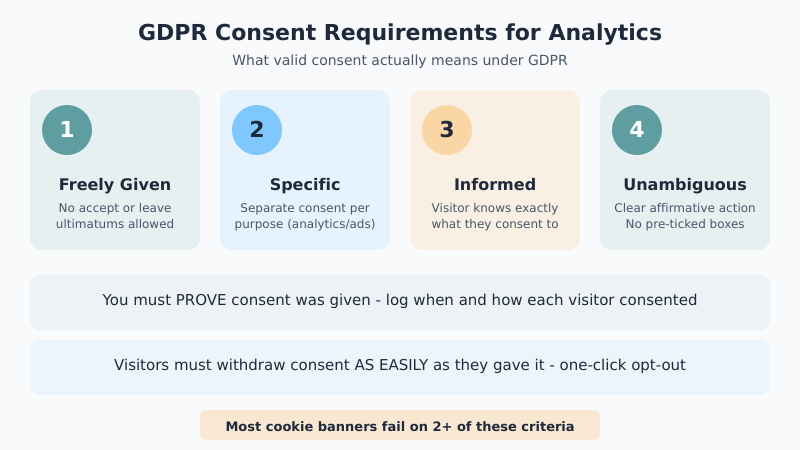
Under GDPR, valid consent must be:
- Freely given — no “accept or leave” ultimatums
- Specific — separate consent for different purposes (analytics vs marketing)
- Informed — the visitor must know exactly what they’re consenting to
- Unambiguous — requires a clear affirmative action (not pre-ticked boxes)
Additionally, you must be able to prove that consent was given. That means logging when and how each visitor consented. Furthermore, visitors must be able to withdraw consent as easily as they gave it.
Most free cookie banner plugins for WordPress fail on at least two of these criteria. They might show a banner, but they don’t actually block tracking scripts until consent is given. Consequently, GA4 starts collecting data the moment the page loads — before the visitor has clicked anything.
This is not a theoretical risk. The French data authority (CNIL) has fined companies millions for exactly this pattern. The Austrian and Italian data protection authorities have gone further, ruling that transferring EU visitor data to Google’s US servers violates GDPR entirely — even with consent.
GA4 and GDPR: What Google Changed (And What They Didn’t)
Google has made several changes to GA4 to address GDPR concerns. Some help. Others are mostly cosmetic.
IP Anonymization in GA4
In Universal Analytics, you had to manually enable IP anonymization. In GA4, IP addresses are automatically anonymized — they’re used for geolocation but not stored in their full form. This is an improvement, but it doesn’t solve the core problem. GA4 still sets cookies that contain unique identifiers, which are considered personal data under GDPR.
Data Retention Settings
GA4 lets you set data retention periods of either 2 months or 14 months. However, this only applies to user-level and event-level data used in explorations — not to the aggregated data in standard reports. For GDPR compliance, setting the shortest retention period (2 months) is generally recommended, though this limits your ability to analyze long-term trends.
Consent Mode v2
This is Google’s biggest GDPR-related feature. Consent Mode v2 lets you adjust how GA4 tags behave based on a visitor’s consent status. When a visitor declines cookies, GA4 sends “cookieless pings” that provide modeled data without setting cookies.
There are two required parameters:
analytics_storage— controls whether analytics cookies can be setad_storage— controls whether advertising cookies can be set
When both are set to “denied,” GA4 still collects some data through modeling, but it doesn’t store cookies on the visitor’s device. Whether this is truly GDPR-compliant is debated — some data protection authorities consider even the cookieless pings to be data processing that requires consent.
If you’ve already set up GA4 on your WordPress site, adding Consent Mode is the minimum step you should take for GDPR compliance.
Step-by-Step: Making Your WordPress Analytics GDPR-Compliant
Here’s the practical process for getting your WordPress analytics into compliance. I’ve done this on dozens of sites, and while the specifics vary, the framework stays the same.
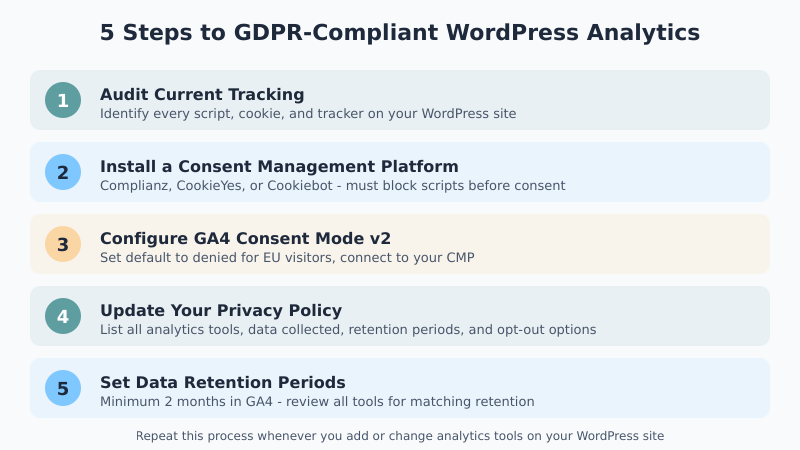
Audit Your Current Tracking
Before you fix anything, find out what you’re actually collecting. Open your WordPress site in Chrome, go to DevTools (F12), and check:
- Open the Network tab and reload the page
- Filter by “google” to see all Google Analytics requests
- Check the Application tab > Cookies to see what cookies are being set
- Look for any third-party scripts loading (Facebook Pixel, hotjar, etc.)
Write down every tracking tool and cookie you find. You need to account for all of them in your consent mechanism — not just GA4. Many WordPress sites have plugins that add tracking scripts without the site owner realizing it.
Set Up a Real Consent Management Platform
Replace your basic cookie banner with a proper Consent Management Platform (CMP). A CMP handles the technical requirements that simple banners miss: blocking scripts before consent, logging consent records, and providing granular options.
For WordPress, these CMPs work well:
- Complianz — WordPress-native, handles script blocking automatically
- CookieYes — solid free tier, integrates with most analytics setups
- Cookiebot (Usercentrics) — widely used, scans your site for cookies automatically
The critical feature is prior blocking — the CMP must prevent analytics scripts from firing until consent is given. Without this, you’re collecting data before consent, which violates GDPR regardless of what your banner says.
Configure GA4 Consent Mode
Once your CMP is in place, connect it to GA4’s Consent Mode. Most quality CMPs support this natively. The setup involves:
- Enable Consent Mode in your GA4 tag (via Google Tag Manager or your WordPress plugin)
- Set default consent states to “denied” for EU visitors
- Configure your CMP to update consent states when visitors make a choice
- Verify that GA4 respects the consent signal by testing with cookies blocked
If you’re using a WordPress plugin like MonsterInsights or Site Kit, check their documentation for Consent Mode integration. Both support it, though the setup process differs between plugins. For a broader look at WordPress analytics plugins and their capabilities, we’ve covered the major options.
Update Your Privacy Policy
Your privacy policy needs to specifically describe your analytics setup. Generic templates aren’t enough. Include:
- Which analytics tools you use (GA4, any others)
- What data they collect (cookies, page views, device info)
- Why you collect it (legitimate purpose)
- How long you retain it (match your GA4 retention settings)
- How visitors can opt out or request data deletion
- Whether data is transferred outside the EU (it is, if you use GA4)
This isn’t optional — GDPR requires transparent disclosure of all data processing activities. Therefore, every time you add or remove an analytics tool, update your privacy policy accordingly.
Set Data Retention Periods
In GA4, go to Admin > Data Settings > Data Retention. Set the retention period to the minimum you can work with. For most WordPress sites, 2 months of user-level data is sufficient since standard reports use aggregated data that isn’t affected by retention settings.
Also review any other analytics tools on your site. If you’re running heatmap tools, form analytics, or session recording software, each one has its own data retention settings that need to match your GDPR obligations.
GDPR-Friendly Alternatives to Google Analytics for WordPress
Here’s the uncomfortable truth: the simplest path to GDPR-compliant analytics is to stop using Google Analytics entirely. Several alternatives don’t require cookies or consent at all.
Koko Analytics is a WordPress plugin that runs entirely on your own server. It doesn’t use cookies, doesn’t collect personal data, and doesn’t send anything to third parties. For most WordPress blogs, it provides everything you need — page views, referrers, and top content — without any GDPR concerns.
Plausible Analytics is a lightweight, privacy-focused alternative that’s GDPR-compliant by design. It doesn’t use cookies, runs on EU servers, and provides clean, simple dashboards. The trade-off is that you get less granular data than GA4.
Matomo can be self-hosted on your WordPress server, giving you full control over data storage. When configured correctly (cookieless tracking, data anonymization), it can be GDPR-compliant without requiring consent for basic analytics.
Each of these alternatives involves trade-offs. You lose some of GA4’s advanced features — like predictive audiences, cross-device tracking, and integration with Google Ads. But if you’re running a content site and don’t need those features, the simplicity of a privacy-first solution often outweighs what you give up.
Common GDPR Analytics Mistakes WordPress Site Owners Make
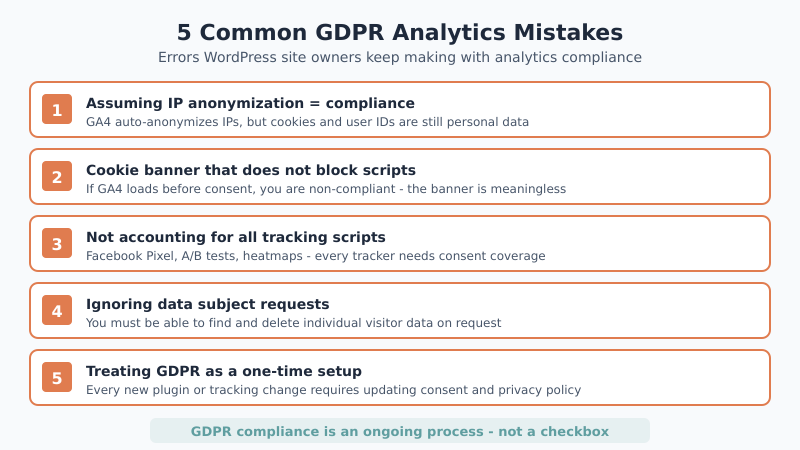
After working with analytics on many WordPress sites, these are the mistakes I see most often:
1. Assuming “IP anonymization = GDPR-compliant.” IP anonymization in GA4 is automatic, but it doesn’t address cookies, user identifiers, or cross-site tracking. It solves one small part of a much larger compliance picture.
2. Using a cookie banner that doesn’t block scripts. If GA4 loads before consent, you’re non-compliant. Period. The banner is meaningless if it doesn’t actually control script execution. This is the single most common mistake.
3. Not accounting for all tracking scripts. GA4 might be your primary analytics tool, but what about Facebook Pixel, Pinterest tags, or that A/B testing plugin you installed six months ago? Every tracking script needs to be covered by your consent mechanism.
4. Ignoring data subject requests. Under GDPR, visitors can request access to their data or ask for deletion. If you can’t locate and delete a specific visitor’s data from GA4, that’s a compliance gap. Specifically, GA4’s User Explorer report can help you find individual user data, but deletion requires using the User Deletion API.
5. Treating GDPR as a one-time setup. Compliance isn’t a checkbox. Every time you add a new plugin, change analytics tools, or modify what you track, your consent mechanism and privacy policy need updating. In other words, GDPR compliance is an ongoing process.
The Minimum Viable Compliance Checklist
If you want to understand what’s essential versus what’s optional, here’s the breakdown:
| Action | Required? | Difficulty | Notes |
|---|---|---|---|
| Install a CMP with script blocking | Yes | Medium | Must block GA4 until consent is given |
| Enable GA4 Consent Mode v2 | Yes (if using GA4) | Medium | Required by Google as of March 2024 |
| Set data retention to minimum | Recommended | Easy | 2 months in GA4 settings |
| Update privacy policy | Yes | Easy | Must list all analytics tools and data collected |
| Audit all tracking scripts | Yes | Medium | Check for plugins adding hidden trackers |
| Log consent records | Yes | Handled by CMP | Must prove consent was given |
| Handle data deletion requests | Yes | Hard | Need process for finding and deleting user data |
| Switch to cookieless analytics | No (simplifies compliance) | Easy | Eliminates need for cookie consent entirely |
| Appoint a DPO | Depends on scale | Varies | Required for large-scale data processing |
The first five items in this table are non-negotiable if you’re running GA4 on a WordPress site that receives EU traffic. Everything below that depends on your specific situation and risk tolerance.
Bottom Line
GDPR-compliant analytics for WordPress isn’t as complicated as it sounds, but it does require more than a cookie banner. The core requirement is simple: don’t collect personal data without informed, freely given consent.
If you want the easiest path to compliance, consider a privacy-friendly analytics alternative that doesn’t need cookies at all. If you need GA4’s advanced features, invest in a proper CMP, enable Consent Mode v2, and keep your privacy policy updated.
Either way, treat compliance as an ongoing practice — not a one-time setup. The regulations aren’t going away, and enforcement is increasing. The good news? A compliant analytics setup often gives you cleaner data, because you’re filtering out the visitors who don’t want to be tracked anyway. That’s data you can actually trust.