
WordPress GDPR compliance sounds intimidating. It involves EU law, cookie banners, data requests, and a long list of plugins that may or may not be handling your visitors’ data correctly. But here’s the thing: most of the practical steps are straightforward once you understand what actually applies to your site.
This guide covers the full WordPress GDPR surface — analytics, consent, forms, embeds, hosting, privacy policy, and data subject requests. Think of it as a working checklist, not a legal opinion. For actual legal advice, talk to a lawyer who specialises in EU data protection law.
Let’s work through it section by section.
What GDPR and ePrivacy Actually Mean for Your WordPress Site
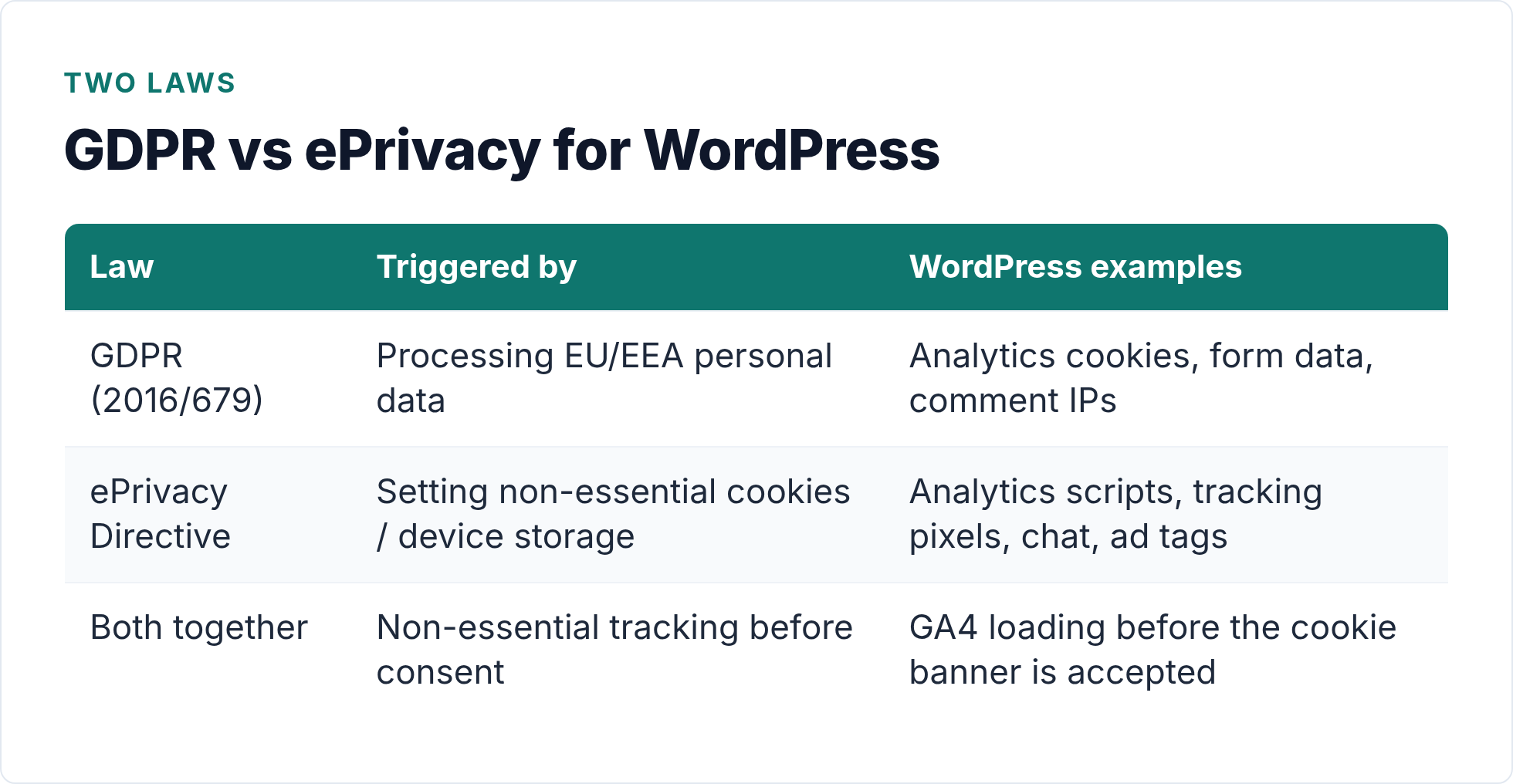
GDPR (Regulation 2016/679) applies whenever you process personal data of people in the EU or EEA — regardless of where your server sits. IP addresses, cookie identifiers, form submissions, and comment data all count as personal data under the regulation.
The ePrivacy Directive (the “cookie law”) sits alongside GDPR. It specifically requires prior, informed consent before you set any non-essential cookies or access information stored on a user’s device. Analytics cookies are non-essential. Therefore, if you run Google Analytics without a consent mechanism, you are almost certainly in breach of ePrivacy rules.
Together, these two laws cover most of what WordPress site owners need to worry about. The table below maps the key concepts to what they mean in practice.
| Legal concept | What it means for your WordPress site |
|---|---|
| Personal data | IPs, cookies with identifiers, form names/emails, comment author data |
| Lawful basis | Consent (most tracking), legitimate interest (server logs), contract (order processing) |
| Prior consent for cookies | Analytics cookies require an opt-in banner before the script loads |
| Data subject rights | Users can request a copy of their data or ask you to delete it |
| Data transfers | Sending data outside the EU/EEA requires a valid transfer mechanism |
Importantly, GDPR applies even if your site is small. The regulation has no minimum traffic threshold. However, enforcement priority tends to land on larger processors. That said, building compliant habits now protects you as your site grows.
Analytics and Tracking: The Biggest GDPR Risk on Most WordPress Sites
Google Analytics is the most common GDPR pressure point for WordPress sites. The GA tracking snippet sets cookies and sends data — including IP addresses — to Google servers in the US. That creates two distinct issues: the consent requirement for cookies, and the cross-border data transfer.
The European Data Protection Board (EDPB) has consistently held that standard GA implementations require explicit consent before the tag fires. Several national DPAs (in Austria, France, Italy, and others) have issued rulings and fines on exactly this point.
Your options in plain terms:
- Gate GA behind consent: Use a certified Consent Management Platform (CMP) with Consent Mode v2. GA only loads after the visitor accepts. This is the most common approach for sites that need GA’s feature depth.
- Switch to a privacy-friendly alternative: Tools like Plausible, Fathom, or Matomo (self-hosted) process data without cookies or cross-border transfers. No consent banner needed for analytics. See the full comparison in our guide to GDPR-compliant analytics for WordPress.
- Go cookieless entirely: Koko Analytics stores all data locally in your WordPress database — no external requests, no cookies, no consent requirement for analytics.
The worst option is doing nothing. Firing GA before consent is the combination of ePrivacy and GDPR most likely to draw a complaint or enforcement action.
Cookie Consent Banners: What “Valid Consent” Actually Requires
A cookie banner that says “By continuing to use this site, you accept cookies” does not meet GDPR’s standard for valid consent. The regulation is specific: consent must be freely given, specific, informed, and unambiguous — and it must be as easy to refuse as to accept.
In practice, a compliant banner needs to:
- Appear before any non-essential cookies fire (not after)
- Offer a genuine “Reject all” option at the same level as “Accept all”
- Avoid pre-ticked boxes or dark patterns that nudge users toward accepting
- Let users change their preference later (usually via a “Cookie settings” link in the footer)
- Log consent records so you can demonstrate compliance if asked
For WordPress, several plugins handle this: Complianz, CookieYes, and Cookiebot are the most commonly used. Each integrates with Consent Mode v2, which allows GA4 to model data for users who decline — so you don’t lose all insight when visitors say no.
However, consent banners introduce a real analytics problem: if 40–60% of EU visitors decline, your GA4 data has significant gaps. That is exactly why many WordPress site owners are switching to cookieless analytics for general traffic data and reserving consented tracking for conversion-critical flows. For a deeper look at how this affects your numbers, see our article on cookie consent and analytics data.
Forms and Comments: The Personal Data You Are Probably Storing Already
Analytics gets most of the attention, but WordPress stores personal data in other places too — and most site owners haven’t thought about them.
Contact Forms
Contact Form 7, WPForms, Gravity Forms, and similar plugins collect names, email addresses, and message content. Under GDPR, you need a lawful basis for storing this data and must tell users how long you keep it. If your form plugin saves entries to the database (many do by default), check how long those records are retained and whether your privacy policy covers it.
Add a clear consent checkbox if you plan to use form data for marketing purposes. For enquiry-handling alone, legitimate interest may apply — but document your reasoning.
Comments
WordPress comments store the commenter’s name, email, website URL, and IP address by default. That IP address is personal data. If you accept comments, your privacy policy must disclose this. You can disable IP storage by adding one line to your theme’s functions.php:
add_filter( 'pre_comment_user_ip', '__return_empty_string' );
Alternatively, set comment moderation and delete IPs from the database manually after moderation. Either way, document the approach in your privacy policy.
WooCommerce and User Accounts
If you run an online store or allow user registration, you are processing significantly more personal data: billing addresses, order history, and payment details. WooCommerce has built-in GDPR tools — make sure customer data retention settings are configured and that your checkout includes the required disclosures.
Embeds and Google Fonts: The Hidden Data Transfers
This section catches a lot of WordPress site owners off-guard. When you embed a YouTube video, a Google Map, or a Spotify player directly in a post, the external service receives your visitor’s IP address the moment the page loads — before any consent is given.
The same applies to Google Fonts served from Google’s CDN. A German court ruling established that loading fonts from fonts.googleapis.com transmits visitor IPs to Google without consent, which violates GDPR. The fine was small (€100), but the principle was clear. Self-hosting fonts removes the issue entirely.
To self-host Google Fonts on WordPress:
- Download your font files from Google Fonts using the “Download family” option.
- Upload the
.woff2files to your theme’s fonts directory. - Reference them via
@font-facein your stylesheet instead of the Google CDN link. - Remove any
wp_enqueue_stylecalls that referencefonts.googleapis.com.
For embeds, use a “consent wrapper” approach: show a placeholder image with a click-to-load button instead of embedding the resource directly. Plugins like Borlabs Cookie or Complianz can automate this for YouTube, Google Maps, and other common services.
Hosting and EU Data Location
Where your server sits affects how straightforward your GDPR story is. Data stored on EU-based servers stays within the jurisdiction of EU law from day one — no transfer mechanism needed.
If you use US-based hosting (or a CDN with US data processing), cross-border transfer rules apply. The current mechanism for EU-US transfers is the Data Privacy Framework (DPF). As of September 2025, the EU General Court upheld the DPF, though an appeal is still pending. Check that your hosting provider or CDN is DPF-certified if you are relying on it as your transfer mechanism.
Alternatively, choosing EU-hosted infrastructure sidesteps the transfer question entirely. Several providers offer EU-specific data regions: Hetzner, Scaleway, OVHcloud, and EU-region tiers from larger providers all work well for WordPress.
| Approach | Transfer issue? | Notes |
|---|---|---|
| EU-hosted server + EU CDN | No | Simplest GDPR position |
| US hosting, DPF-certified provider | Covered (while DPF valid) | Verify DPF certification in provider’s DPA |
| Self-hosted analytics (Matomo/Koko) | No transfer | Data stays on your server |
| US-hosted SaaS tools without DPF | Yes — needs SCCs or other mechanism | Check each tool’s DPA |
For most WordPress site owners, the practical answer is: choose EU-hosted services where you have an easy option, and verify DPF certification for US tools you rely on. Keep records of what you use and why.
Privacy Policy: What Your WordPress Site Must Include
WordPress includes a built-in privacy policy generator under Settings → Privacy. It is a useful starting point, but the generated text is generic. You need to customise it to reflect what your site actually does.
A compliant privacy policy for a typical WordPress site should cover:
- What personal data you collect and why (analytics, forms, comments, accounts)
- The lawful basis for each type of processing
- How long you retain each type of data
- Whether you transfer data outside the EU and under what mechanism
- Which third-party services process data on your behalf (GA, your hosting provider, email provider, payment processor)
- How users can exercise their rights (access, erasure, portability, objection)
- Your contact details (or your DPO’s, if you have one)
The ICO’s guidance on individual rights is one of the clearest plain-language references for what users are entitled to expect. Review it when writing this section. Additionally, the GDPR.eu privacy notice checklist is a practical verification tool.
Link to your privacy policy from your footer, your cookie banner, and any forms that collect personal data. Visibility matters for compliance.
Data Subject Requests: WordPress Has the Tools Built In
GDPR gives users the right to request a copy of their data (access request) or ask you to delete it (erasure request). WordPress core includes tools for both, added in version 4.9.6.
You’ll find them under Tools → Export Personal Data and Tools → Erase Personal Data. Here is how they work:
- You enter the requester’s email address and send a verification link.
- The user confirms their request via email.
- WordPress gathers all personal data it holds for that email (comments, user account data, WooCommerce orders if the plugin is registered) and produces a downloadable ZIP (for export) or deletes the data (for erasure).
A few important caveats. First, these tools only cover data that WordPress core and registered plugins expose to the privacy API. Third-party plugins that store personal data must register with the API to be included — not all do. Second, erasure does not remove data from your server backups. Your privacy policy should explain backup retention periods. Third, you must respond to requests within 30 days under GDPR.
For detailed guidance on each tool, see the WordPress privacy documentation.
Plugin Hygiene: Auditing What Your Plugins Are Sending
Every active plugin on your WordPress site is a potential GDPR surface. Many plugins phone home to external servers — for licence validation, automatic updates, telemetry, or embedded analytics. Each of those connections may transfer personal data.
A practical audit has three steps:
- List all active plugins and check each one’s privacy policy for data collection disclosures.
- Use browser developer tools (Network tab) or a tool like Blacklight to observe which third-party domains receive requests when a page loads. Any you don’t recognise deserves investigation.
- Deactivate plugins you don’t actively use. An inactive but installed plugin is less of a risk than an active one — but removing it entirely is cleanest.
Common offenders include social sharing plugins (which load external scripts), live chat widgets, and marketing automation tools that embed tracking pixels. Each of these needs either a consent gate or a clear legitimate basis documented in your privacy policy.
Also consider: do your plugins process data in the EU? Check their privacy documentation and Data Processing Agreements (DPAs). Reputable plugin vendors publish these on their websites. If a plugin you rely on doesn’t have a DPA available, that is a risk flag.
Putting It All Together: Your WordPress GDPR Compliance Checklist
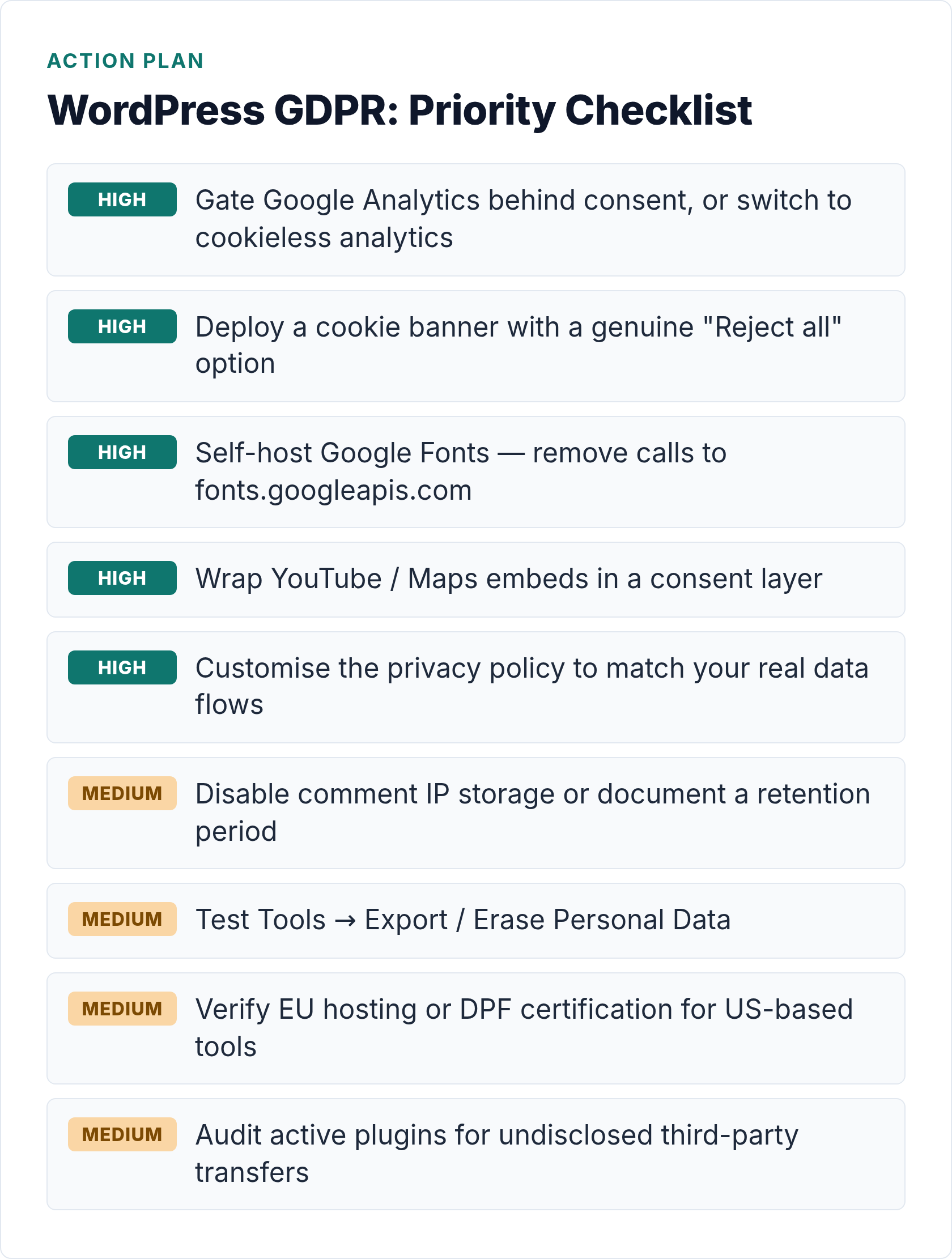
GDPR compliance for WordPress is not a single setting or a one-time task. It is an ongoing practice across several layers of your site. Working through the checklist below covers the main bases for a typical content or small business WordPress site.
| Area | Action | Priority |
|---|---|---|
| Analytics | Gate GA behind consent OR switch to cookieless tool | High |
| Cookie banner | Deploy a compliant CMP with genuine reject option | High |
| Google Fonts | Self-host font files, remove Google CDN calls | High |
| Embeds | Wrap YouTube/Maps/etc. in a consent layer | High |
| Forms | Disclose data use; add marketing consent checkbox | Medium |
| Comments | Disable IP storage or document retention | Medium |
| Privacy policy | Customise WP’s generated policy to reflect your site | High |
| Data requests | Test Export/Erase tools; define a response process | Medium |
| Hosting | Verify EU hosting or DPF certification for US providers | Medium |
| Plugin audit | Review active plugins for third-party data flows | Medium |
I’ve worked through this checklist on a number of client sites, and the biggest wins almost always come from the top three items: analytics, consent, and fonts. Get those right first, then work down the list.
For the analytics piece specifically, if you want to skip the consent-banner complexity altogether, cookieless analytics is worth exploring properly. Our guide on analytics without cookies for WordPress site owners covers how each approach works and what you give up.
Bottom Line
WordPress GDPR compliance comes down to one core principle: don’t process personal data without a valid reason and, for non-essential tracking, without explicit consent. That covers the majority of risks most WordPress sites face.
Start with analytics and your cookie banner — those are the two areas where enforcement has been most active. Then work through the rest of the checklist systematically. You don’t have to do everything at once, but each item you complete reduces your exposure.
The tools are mostly already there in WordPress core and in the plugin ecosystem. The work is in knowing what to configure and why.

Written by Ellie
Former Head of Analytics at a European digital agency. 8+ years making WordPress analytics make sense. Google Analytics certified. I write the guides I wish existed when I started.
More about me →