
Your WordPress site is live, you’ve picked a host, and things are running. But if EU visitors land on your site and you haven’t thought through where their data actually lives — on which servers, in which country, under whose legal responsibility — you have a GDPR problem that goes well beyond your analytics plugin.
GDPR-compliant WordPress hosting isn’t a marketing checkbox on a hosting plan page. It’s a combination of infrastructure decisions, legal agreements, and ongoing practices. This guide explains exactly what to look for, what to ask, and what warning signs to watch for — so you can make an informed choice rather than relying on a host’s PR copy.
Note: This article covers hosting and infrastructure decisions from a practical standpoint. It is not legal advice. For advice specific to your situation, consult a qualified data protection professional.
What GDPR Actually Requires from Your Hosting Setup
Most discussions of GDPR for WordPress focus on cookie banners and analytics. But GDPR Regulation 2016/679 also applies to the infrastructure layer — specifically, to any third party that processes personal data on your behalf.
Your web host processes personal data. Every time a visitor loads your site, the server logs their IP address. Contact form submissions, comments, WooCommerce orders, and account registrations all move through your host’s infrastructure. Under GDPR, your host is a data processor acting on your instructions, and you are the data controller responsible for what happens to that data.
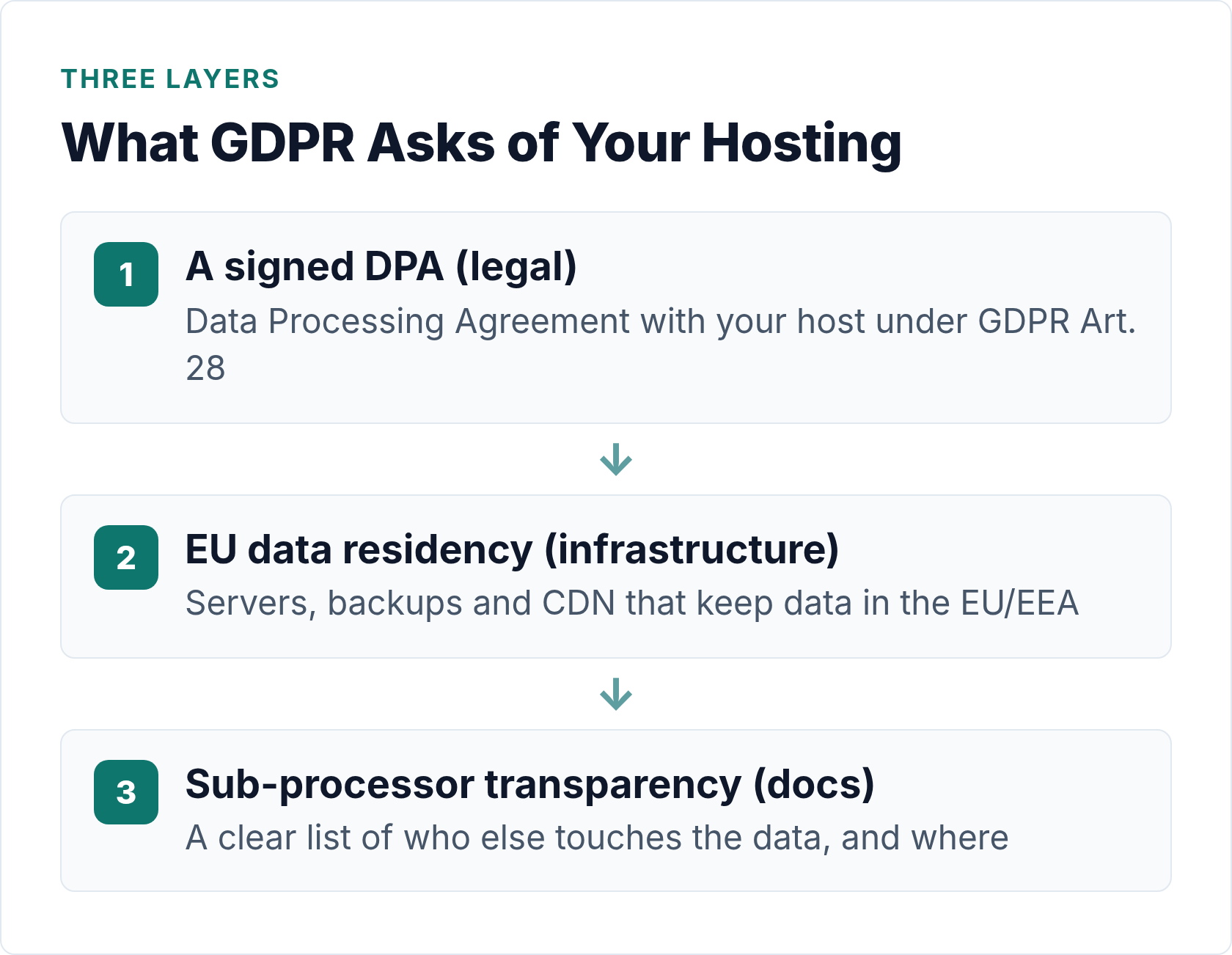
That relationship creates three concrete obligations:
- You must sign a Data Processing Agreement (DPA) with your host.
- You must ensure data is stored and processed lawfully — including where in the world that happens.
- You must be able to answer questions about your processing chain if a regulator or data subject asks.
Hosts that take GDPR seriously make all three of these straightforward. Hosts that don’t will be vague, slow to produce documentation, or simply unable to confirm where your data lives.
The DPA: Your Most Important Document
A Data Processing Agreement is the legal contract that defines the relationship between you (controller) and your host (processor). Article 28 of the GDPR requires this contract to exist whenever a processor handles personal data on a controller’s behalf.
Without a DPA in place, you’re in violation — even if the host itself is doing everything right technically. This is one of the most commonly overlooked requirements for small site owners.
A valid DPA must cover:
- The subject matter and duration of processing
- The nature and purpose of the processing
- The type of personal data involved
- The categories of data subjects (your visitors, customers, etc.)
- Your instructions to the processor and their obligation to follow them
- Confidentiality obligations for anyone with data access
- Security measures in place
- Sub-processor arrangements (more on this below)
- Assistance with data subject rights requests
- Deletion or return of data at the end of the contract
Many established hosts — Kinsta, WP Engine, SiteGround, Hetzner, and others — publish their DPA directly in their legal documentation. You typically sign it online. If a host can’t point you to a DPA in under 30 seconds, that’s a red flag. If they don’t offer one at all, move on.
Where Your Data Actually Lives: EU Residency
Choosing a host that advertises “EU servers” is not the same as ensuring your data stays in the EU. You need to verify a few things.
Primary server location
Most hosts let you choose a datacenter region when you sign up. Select an EU region — typically Frankfurt, Amsterdam, London (post-Brexit note: UK is not EEA), Dublin, or Warsaw. Confirm this in your hosting dashboard after signup, not just on the marketing page.
Backups
This is where things get interesting. Your primary server might be in Frankfurt, but where do your automated backups go? Some hosts replicate backups to US-based storage by default. Ask explicitly: In which region are automated backups stored? If backups go outside the EEA, that’s a data transfer that requires justification under GDPR.
CDN nodes
A Content Delivery Network caches your site’s static files (images, CSS, scripts) on servers around the world to speed up delivery. The side effect: copies of your content — and potentially cached form data or URLs with personal information — sit on servers in the US, Asia, and elsewhere.
Most CDNs that serve EU visitors also have EU nodes. The question is whether EU visitors are served exclusively from EU nodes or whether requests can route outside the EEA. Some hosts allow you to restrict CDN to EU-only, which is worth asking about.
Email infrastructure
Your WordPress site sends transactional emails — password resets, order confirmations, contact form notifications. By default, WordPress uses your server’s mail function. Many sites switch to an SMTP service like Mailgun, SendGrid, or Postmark. If your SMTP provider is US-based and processes email content (which can contain personal data), that’s another transfer to account for in your privacy documentation.
EU-US Data Transfers: What You Actually Need to Know
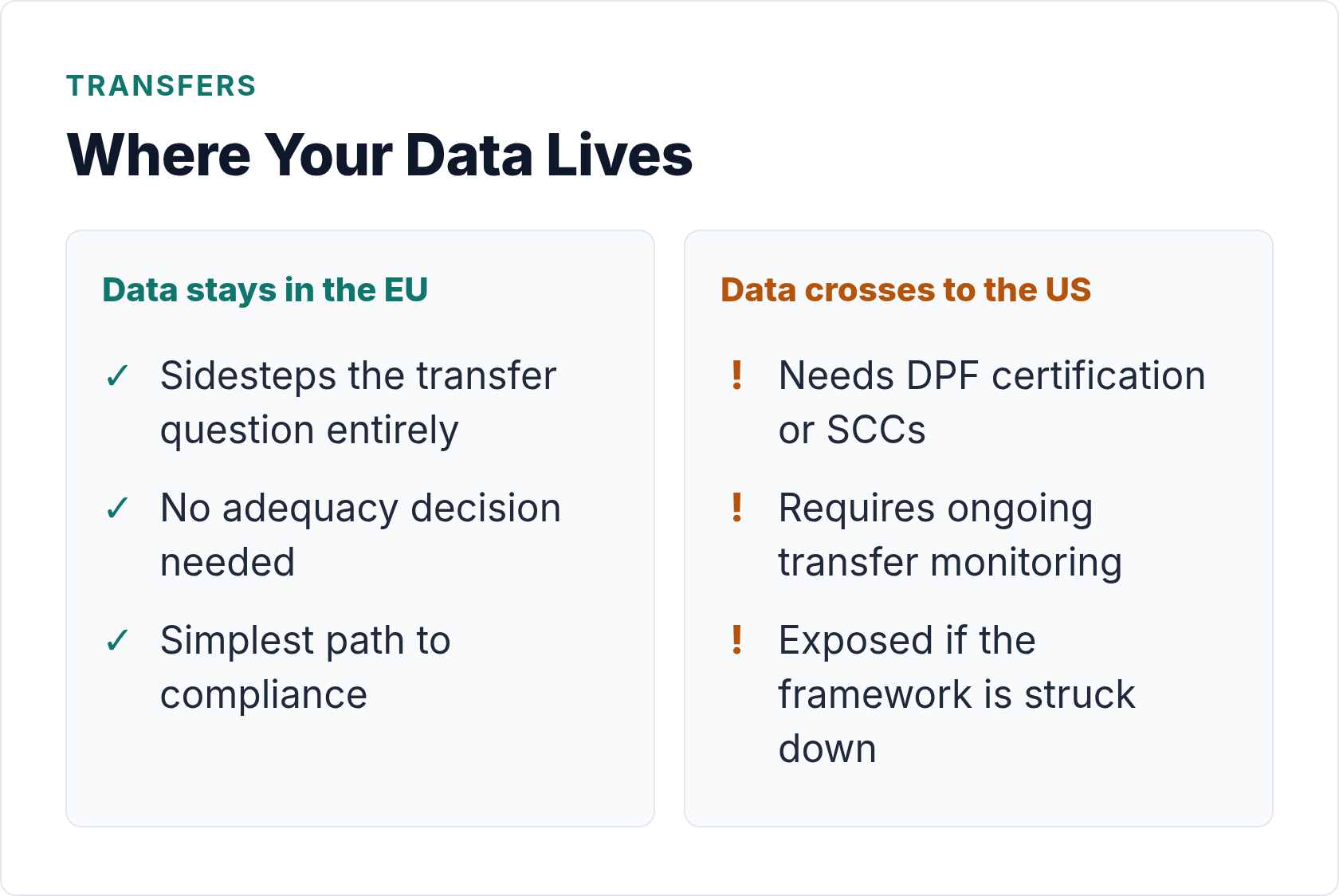
EU-US data transfers have been contentious since the original Safe Harbor framework was struck down in 2015, followed by Privacy Shield in 2020. The current framework — the EU-US Data Privacy Framework (DPF) — was adopted in July 2023 and, as of mid-2026, remains in force. The EU’s General Court upheld it in September 2025, though an appeal is pending.
That means transfers to DPF-certified US companies are currently lawful. However, relying on the DPF adds complexity to your documentation and exposure to the risk that the framework could be challenged again in the future.
The simpler approach: keep your data in the EU. If your host, backups, and SMTP provider all operate within the EEA, you sidestep the transfer question entirely. You still need Standard Contractual Clauses or another valid mechanism documented for any sub-processors outside the EEA, but limiting your exposure makes compliance easier to maintain.
For a deeper look at how this interacts with your analytics setup, see our guide on GDPR-compliant analytics for WordPress.
What to Ask a Host Before You Sign Up
The right questions separate hosts that genuinely support GDPR compliance from those that paste “GDPR compliant” on their homepage and call it done.
| Question | What a good answer looks like |
|---|---|
| Do you offer a Data Processing Agreement? | Yes, here’s the link — or it’s part of our Terms of Service. |
| In which region are my primary files and database stored? | Specific EU datacenter (e.g., Frankfurt, Amsterdam). Not “EU or US depending on load.” |
| Where are automated backups stored? | Same EU region as primary, or a named EU backup location. Not “replicated globally.” |
| Do you use a CDN? Can EU visitors be served from EU-only nodes? | Yes, we use Cloudflare/Fastly/own CDN — EU-only routing is available/default. |
| Who are your sub-processors, and where are they located? | A published sub-processor list with locations and what each one does. |
| How will you notify me of a data breach? | Within 72 hours, per Article 33 GDPR. In writing. |
| Can I request deletion of all my data when I cancel? | Yes, we delete all data within X days of account closure. |
Save the responses. If there’s ever a regulator inquiry, having documented due diligence in writing is far better than a phone conversation you can’t prove happened.
Criteria for Evaluating GDPR-Compliant WordPress Hosts
Rather than recommending specific hosts — which change their terms and infrastructure over time — here’s a criteria framework you can apply to any host you’re evaluating.
| Criterion | Must Have | Nice to Have |
|---|---|---|
| DPA availability | Published, signable DPA | DPA auto-included with account creation |
| Data residency | EU datacenter option | EU-only default, no US fallback |
| Backup location | Backups in EEA | Backup region is configurable |
| Sub-processor transparency | Published sub-processor list | Notification when sub-processors change |
| Security certifications | ISO 27001 or SOC 2 | ISO 27701 (privacy extension) |
| Breach notification | 72-hour commitment in writing | Automated breach notification system |
| Data deletion on cancellation | Confirmed deletion process | Deletion within 30 days, in writing |
| CDN region control | EU CDN nodes available | EU-only CDN routing option |
Security certifications matter here because they provide independent verification that a host actually implements the security measures they claim. ISO 27001 in particular shows that information security is managed systematically, not just claimed in marketing copy.
Hosting isn’t the only infrastructure layer to audit. Your cookie consent setup also affects what data flows where, and getting that right ties directly into what your host ends up processing.
Signs a Host Is Not Taking GDPR Seriously
These are concrete warning signals — not hypotheticals. I’ve encountered all of them when evaluating hosting options for client sites.
- No DPA, or a DPA that’s just a renamed Terms of Service. A real DPA specifically addresses the Article 28 requirements. A generic ToS that mentions “we take privacy seriously” doesn’t qualify.
- Vague answers about where data lives. “Our servers are located in secure, modern datacenters” tells you nothing. You need a region or country, not a reassurance.
- Backups stored in the US with no alternative. Common with budget hosts that use US-based cloud storage (AWS S3 us-east-1, etc.) for backup snapshots without offering any alternative.
- No sub-processor list, or one that’s never been updated. A host that uses dozens of third-party services but publishes no sub-processor list is either not tracking it themselves or doesn’t want you to know.
- “GDPR compliant” as a feature bullet without documentation. Compliance is documented, not just declared. If the only evidence is a badge on the homepage, ask for the documentation — and watch what happens.
- No answer to the breach notification question. Every host should have a documented incident response process. If they don’t know how they’d notify you, they haven’t thought it through.
- Forced bundled CDN with no region control. Some managed WP hosts bundle a CDN where you have no say over which nodes serve your traffic. That may be fine for performance but problematic for data residency.
The Broader Infrastructure Picture
Hosting is one piece of the puzzle. Your full GDPR infrastructure picture includes your analytics tool, your SMTP provider, any third-party plugins that make external requests, embedded media (YouTube iframes, Google Maps, external fonts), and any SaaS tools your WordPress site connects to.
Google Fonts served from Google’s servers can transmit visitor IP addresses to the US. A German court found this problematic in 2022. Self-hosting your fonts eliminates the issue entirely — a one-time fix with no ongoing risk.
Similarly, if you’re running cookieless analytics, check where that tool stores data. An EU-hosted cookieless analytics tool combined with an EU-based host means virtually all your data processing happens within the EEA, which significantly simplifies your GDPR documentation.
The European Data Protection Board’s guidance on data transfers is worth bookmarking if you need to document transfer mechanisms for any non-EU service you use.
Bottom Line
Choosing a GDPR-compliant WordPress host comes down to three things: a real DPA, EU data residency for your primary storage and backups, and transparency about sub-processors. Everything else is secondary to those fundamentals.
Don’t rely on a hosting plan’s marketing page to make this assessment. Ask the questions in the checklist above. Get answers in writing. Check the gdpr.eu guidance on data processing agreements to understand what a valid DPA actually needs to contain.
And if your current host can’t answer basic questions about where your backups live? That’s useful information too — it just tells you it’s time to switch.

Written by Ellie
Former Head of Analytics at a European digital agency. 8+ years making WordPress analytics make sense. Google Analytics certified. I write the guides I wish existed when I started.
More about me →