Cookies are on borrowed time. Browsers are blocking them, laws are restricting them, and visitors are rejecting them. If you run a WordPress site and rely on Google Analytics for traffic data, you’re already feeling the impact — your numbers don’t add up anymore. That’s why analytics without cookies isn’t just a privacy trend. It’s becoming a practical necessity.
In this guide, you’ll learn how cookieless analytics actually works, compare the best options for WordPress, and figure out which approach fits your site. No theory for theory’s sake — just what you need to make a smart decision.
Why Analytics Without Cookies Matters Now
Three forces are converging to make traditional cookie-based tracking unreliable. Understanding them helps you see why this isn’t a passing fad.
Browser Changes Are Shrinking Your Data
Safari’s Intelligent Tracking Prevention (ITP) has been blocking third-party cookies since 2017 and now caps first-party cookie lifetimes at 7 days for scripts identified as trackers. As a result, returning visitor data in GA4 is increasingly unreliable for the roughly 20% of web users on Safari.
Firefox Enhanced Tracking Protection (ETP) similarly blocks known trackers by default. Meanwhile, Chrome’s Privacy Sandbox initiative — despite multiple delays — signals that Google itself acknowledges the cookie era is ending. Even though Chrome hasn’t fully deprecated third-party cookies yet, the direction is clear.
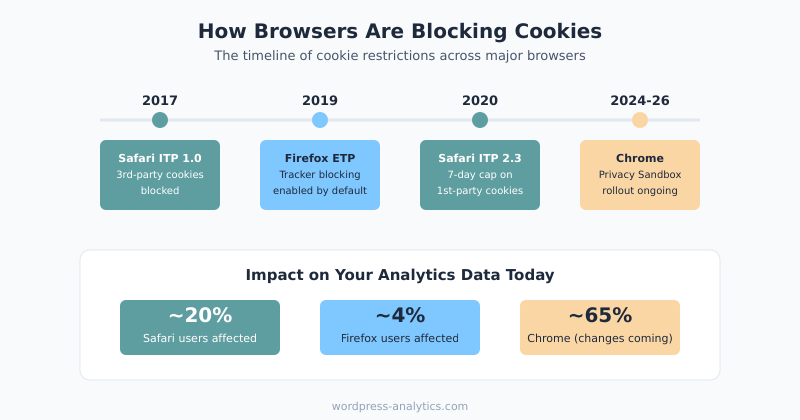
Consequently, even without consent banners, your cookie-based analytics data is already degraded. Safari and Firefox users show up as “new” visitors on every visit, which inflates your user counts and makes engagement metrics unreliable.
Privacy Laws Keep Getting Stricter
The GDPR and ePrivacy Directive require consent before setting analytics cookies in the EU. However, enforcement is intensifying. The French data authority (CNIL) has issued major fines for non-compliant analytics implementations. Austria’s DPA ruled that standard GA4 usage transferred EU data to the US illegally.
Beyond Europe, California’s CCPA/CPRA, Brazil’s LGPD, and Canada’s proposed CPPA all impose restrictions on tracking. Therefore, if your WordPress site has any international audience, cookie-based analytics creates an expanding compliance burden.
How Cookieless Analytics Actually Works
If there are no cookies, how do these tools count visitors? There are several approaches, and understanding the differences matters.
Session hashing is the most common method. Tools like Plausible generate a daily hash from the visitor’s IP address + User-Agent string + a rotating salt. This creates a temporary identifier that recognizes a visitor during a single day but cannot track them across days. Essentially, it gives you session-level data without persistent identification.
Fingerprint-free estimation goes even further. Some tools aggregate data at the page level without attempting to identify individual visitors at all. You get pageview counts and referrer data but no user-level metrics.
Aggregate-only data collection means the analytics tool never stores individual visit records. Instead, it updates counters in real time. Koko Analytics takes this approach — it counts pageviews and referrers without storing any visitor-identifiable data.
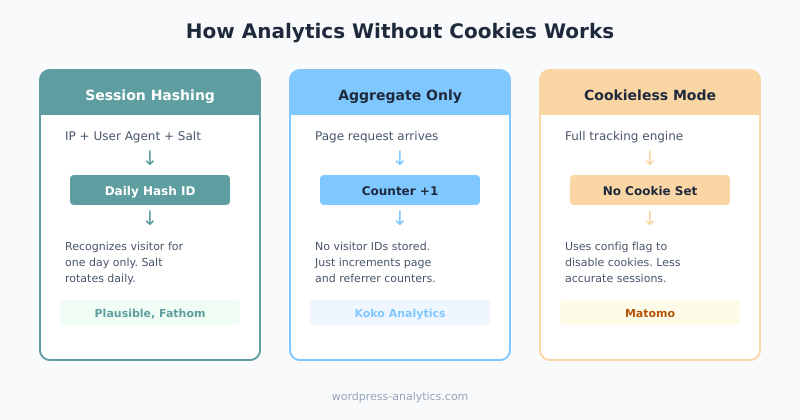
In all cases, the key principle is the same: collect enough data to understand traffic patterns without creating a profile that could identify an individual. As a result, no consent banner is needed because no personal data is processed.
Cookieless Analytics Options for WordPress
Four tools stand out for WordPress site owners who want analytics without cookies. Each takes a different approach, and they’re not interchangeable. Let’s compare them honestly.
Plausible Analytics
Plausible is the most popular privacy-first analytics tool for WordPress. It’s an EU-hosted, open-source alternative to GA4 that tracks visitors using daily session hashing.
| Aspect | Details |
|---|---|
| Pros | Clean dashboard, easy WordPress plugin, EU-hosted, GDPR compliant without consent, open-source, lightweight script (under 1KB) |
| Cons | No returning visitor tracking, limited custom events (compared to GA4), no funnel analysis, paid only |
| Pricing | From $9/month (10K pageviews), $19/month (100K), $69/month (1M) |
| Best for | Blogs, content sites, small businesses that want simple, accurate traffic data |
In my experience, Plausible gives you the clearest picture of actual traffic volume. The dashboard loads in under a second and shows you exactly what you need — top pages, traffic sources, countries, and devices. Nothing more, nothing less.
Fathom Analytics
Fathom Analytics is another privacy-first option, built by a small team in Canada. It uses a unique “intelligent routing” system that processes data through EU-based infrastructure before discarding personal information.
| Aspect | Details |
|---|---|
| Pros | Excellent uptime, EU data processing, custom event tracking, email reports, GA4 data importer |
| Cons | Higher starting price, closed-source, fewer integrations than Plausible |
| Pricing | From $14/month (100K pageviews), $24/month (200K), $44/month (500K) |
| Best for | Businesses that want event tracking and reliable uptime with privacy compliance |
Fathom’s event tracking is notably more mature than Plausible’s, which makes it a stronger choice if you need to track button clicks, form submissions, or other interactions alongside pageviews.
Koko Analytics
Koko Analytics is a free, open-source WordPress plugin that stores all data locally in your WordPress database. It collects pageviews and referrers without any external service or cookies.
| Aspect | Details |
|---|---|
| Pros | Completely free, self-hosted (data stays on your server), zero external requests, minimal performance impact |
| Cons | Very basic — pageviews and referrers only, no traffic source breakdown, no event tracking, no geographic data |
| Pricing | Free (open-source, premium add-ons available) |
| Best for | Personal blogs, privacy-maximalists, sites that only need basic pageview data |
If you just want to know which posts get the most views and where visitors come from, Koko Analytics does the job without any external dependencies. However, it won’t replace GA4 for any kind of behavioral analysis.
Matomo (Self-Hosted, Cookieless Mode)
Matomo is the most feature-rich privacy analytics platform. When self-hosted on your WordPress server, it can run in cookieless mode while still providing detailed analytics comparable to GA4.
| Aspect | Details |
|---|---|
| Pros | Feature-rich (goals, funnels, heatmaps), self-hosted option, cookieless mode available, GDPR compliant, free self-hosted version |
| Cons | Complex setup, resource-intensive on your server, cookieless mode reduces data accuracy, requires maintenance |
| Pricing | Free (self-hosted), from $19/month (cloud-hosted) |
| Best for | Sites that need GA4-level features but want full data ownership and privacy compliance |
Matomo in cookieless mode is the closest you can get to GA4 functionality while respecting privacy. That said, self-hosting Matomo requires server resources and ongoing maintenance, which may be overkill for smaller WordPress sites.
Analytics Without Cookies: Comparison at a Glance
| Feature | Plausible | Fathom | Koko Analytics | Matomo |
|---|---|---|---|---|
| Cookie-free | Yes | Yes | Yes | Optional |
| Consent needed | No | No | No | No (cookieless mode) |
| Self-hosted option | Yes | No | Yes (only) | Yes |
| Custom events | Basic | Yes | No | Yes |
| Funnel tracking | No | No | No | Yes |
| Geographic data | Yes | Yes | No | Yes |
| WordPress plugin | Yes | Yes | Yes | Yes |
| Starting price | $9/mo | $14/mo | Free | Free / $19/mo |
| Data ownership | Plausible EU | Fathom CA/EU | Your server | Your server |
GA4 in a Cookieless World — Consent Mode and Modeling
You don’t have to abandon GA4 entirely to move toward analytics without cookies. Google’s Consent Mode v2 is their answer to the privacy shift, and it’s worth understanding even if you choose a different path.
When Advanced Consent Mode is enabled, GA4 sends cookieless pings for visitors who haven’t consented. These pings contain no personal identifiers but include aggregated signals like page URL, timestamp, and browser type. Google then uses machine learning to model the missing data and fill gaps in your reports.
Does it work? Partially. Google claims behavioral modeling can recover a significant portion of lost data. However, the accuracy depends on your traffic volume — smaller sites may not meet the minimum thresholds for modeling to activate. Additionally, modeled data is an estimate, not a measurement, so it introduces uncertainty into your reports.
For WordPress site owners who have invested heavily in GA4 events, conversion funnels, and custom reports, Consent Mode v2 is a reasonable middle ground. You keep your existing setup while recovering some lost data. But it’s not the same as true cookieless analytics — you’re still relying on consent for full tracking, and the modeled data is a statistical approximation.
What You Lose Without Cookies (The Honest Trade-Offs)
Switching to analytics without cookies isn’t free. Here’s what you give up, because I think it’s important to be upfront about the limitations.
No returning visitor identification. Without persistent cookies, you can’t tell if someone visited your site last week and came back today. Every visit looks like a new visitor. Consequently, metrics like “returning visitor rate” and “user lifetime value” become impossible to track accurately.
Limited cross-session attribution. If a visitor finds your site through organic search on Monday and comes back directly on Friday to buy something, cookie-based analytics connects those two sessions. Cookieless analytics can’t. Therefore, your attribution data becomes strictly last-touch.
Session stitching issues. If a visitor opens multiple tabs or navigates from your blog to your shop on a different subdomain, cookies help stitch those interactions into one session. Without cookies, they may appear as separate sessions, which inflates your session counts and deflates time-on-site metrics.
Reduced personalization data. If you use analytics data to personalize content, recommend posts, or target ads, cookieless tools give you much less to work with. For content-focused WordPress sites, this rarely matters. For e-commerce sites, it can be significant.
That said, for many WordPress site owners, these trade-offs are acceptable. If your primary questions are “how much traffic do I get?” and “which content performs best?” — cookieless analytics answers both questions more accurately than consent-gated GA4, because it captures all visitors instead of just the ones who click “accept.”
Choosing the Right Analytics Without Cookies Setup for Your WordPress Site
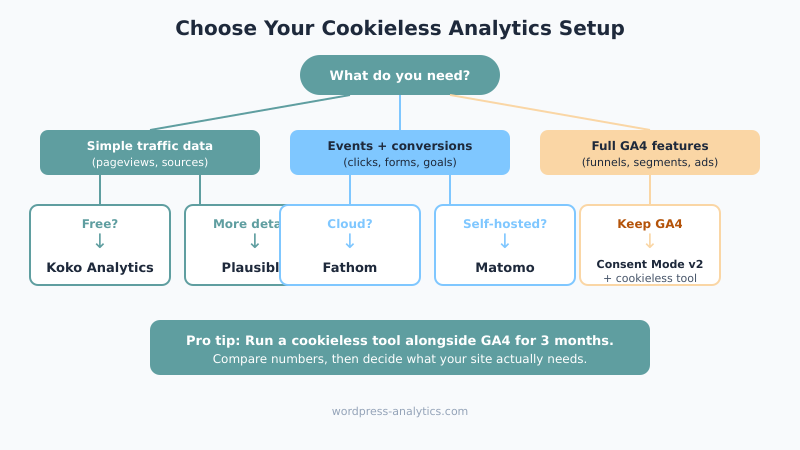
With all these options, how do you actually decide? Here’s a practical framework based on what I’ve seen work for different types of WordPress sites.
If you run a personal blog or content site: Start with Koko Analytics (free) or Plausible ($9/month). You need pageviews, top content, and traffic sources. You don’t need funnels, events, or cross-session tracking. These tools give you 100% visitor coverage with zero consent hassle.
If you run a business site with lead generation: Consider Fathom or Plausible with custom events. You need to track form submissions and CTA clicks alongside traffic data. Both tools support basic event tracking without cookies. Alternatively, keep GA4 with Advanced Consent Mode and run Plausible alongside it for accurate traffic volume.
If you run an e-commerce WordPress site: Matomo self-hosted in cookieless mode gives you the closest feature parity with GA4. You get goal tracking, funnels, and e-commerce reports while maintaining privacy compliance. However, be prepared for more setup complexity and server resource requirements.
If you’re heavily invested in the Google ecosystem: Stick with GA4 but enable Consent Mode v2 with Advanced mode. Use Google Tag Manager for implementation. This preserves your existing reports and segments while recovering modeled data for non-consenting users. Then consider adding a simple cookieless tool alongside GA4 to validate your traffic numbers.
If privacy is your top priority: Go with Koko Analytics or self-hosted Plausible. No external data transfers, no third-party processing. Your analytics data never leaves your server. This is the most privacy-respecting approach available.
One approach I’ve seen work well is running two tools simultaneously during a transition period. Keep GA4 for its advanced features while using a cookieless tool as your source of truth for traffic volume. After a few months, you’ll have a clear picture of how much data GA4 is missing and whether the cookieless tool meets your needs on its own.
Bottom Line
Analytics without cookies isn’t just about privacy compliance — it’s about data accuracy. When 30-50% of your visitors reject cookies, your GA4 reports become an unreliable sample rather than a complete picture. Cookieless tools like Plausible, Fathom, Koko Analytics, and Matomo solve this by tracking visitors without persistent identifiers.
The trade-off is real: you lose returning visitor data, cross-session attribution, and some advanced features. However, for most WordPress content sites, what you gain — complete traffic coverage, simpler compliance, and faster page loads — outweighs what you lose. Start with one cookieless tool alongside your existing setup. Compare the numbers. Then decide what your site actually needs.

Written by Ellie
Former Head of Analytics at a European digital agency. 8+ years making WordPress analytics make sense. Google Analytics certified. I write the guides I wish existed when I started.
More about me →