You’re running Facebook ads, sending email newsletters, and posting on LinkedIn. Traffic is coming in. But which campaign actually drove that sale last week?
If your URLs don’t have UTM parameters, the answer is probably “I don’t know.” And that’s a problem — you’re spending money without knowing what’s working.
UTM parameters are simple tags you add to your URLs to track where traffic comes from. They take 30 seconds to set up, cost nothing, and give you the data you need to stop guessing. Here’s how to use them on your WordPress site.
What Are UTM Parameters?
UTM parameters (Urchin Tracking Module) are tags added to the end of a URL that tell your analytics tool where a visitor came from. When someone clicks a link with UTM parameters, that data flows into Google Analytics, Matomo, or whatever analytics platform you use.
A URL with UTM parameters looks like this:
https://yoursite.com/landing-page/?utm_source=facebook&utm_medium=paid&utm_campaign=spring_sale
When a visitor clicks this link, your analytics will record:
- Source: facebook
- Medium: paid
- Campaign: spring_sale
Without UTM parameters, this same visit might show up as “direct” or “referral” — useless for understanding campaign performance.
The 5 UTM Parameters Explained
There are five standard UTM parameters. Three are required, two are optional:
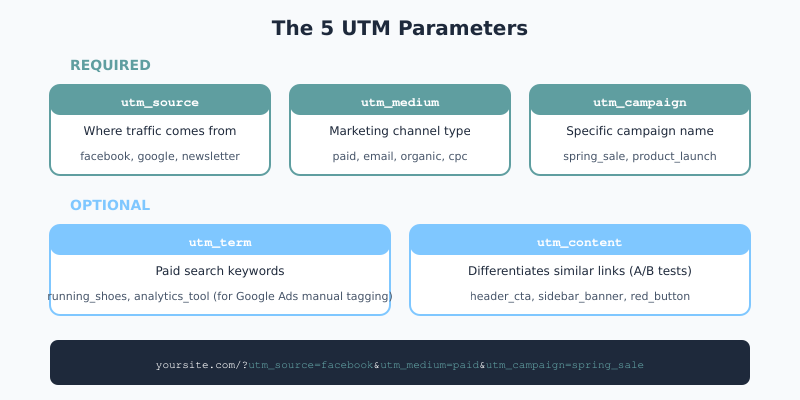
| Parameter | Required? | What It Tracks | Example |
|---|---|---|---|
utm_source |
Yes | Where the traffic comes from | facebook, newsletter, google |
utm_medium |
Yes | The marketing channel type | paid, email, organic, cpc |
utm_campaign |
Yes | The specific campaign name | spring_sale, product_launch |
utm_term |
No | Paid search keywords | running_shoes, analytics_tool |
utm_content |
No | Differentiates similar links | header_cta, sidebar_banner |
utm_source
Identifies the platform or website sending traffic. Be specific and consistent:
facebook— not “Facebook” or “fb”newsletter— not “email” (save that for medium)linkedin— not “LinkedIn” or “li”
utm_medium
Describes the marketing channel. Google Analytics recognizes these standard values:
cpc— paid search (cost per click)paidorpaidsocial— paid social adsemail— email campaignsorganic— organic social postsreferral— partner or affiliate linksdisplay— banner ads
utm_campaign
Names your specific campaign. Use lowercase and underscores:
black_friday_2026product_launch_v2webinar_march
utm_term (Optional)
Primarily used for paid search to track which keyword triggered the ad. If you’re using Google Ads with auto-tagging, you don’t need this — gclid handles it automatically.
utm_content (Optional)
Differentiates links that point to the same URL. Useful for A/B testing:
red_buttonvsblue_buttonheader_linkvsfooter_linkimage_advstext_ad
How to Build UTM URLs
You have three options for creating UTM-tagged URLs:
Option 1: Google’s Campaign URL Builder (Free)
Google offers a free Campaign URL Builder tool. Enter your URL and parameters, and it generates the tagged link.
Pros: Free, simple, no account needed
Cons: Manual process, no history saved
Option 2: WordPress Plugins
Several WordPress plugins can build and track UTM parameters:
| Plugin | Best For | Price |
|---|---|---|
| MonsterInsights | GA4 users, built-in URL builder | Free / $99+/yr |
| Analytify | Campaign tracking dashboard | Free / $59+/yr |
| HandL UTM Grabber | Form integration, lead tracking | Free / $49+/yr |
| AFL UTM Tracker | WooCommerce attribution | $49+ |
If you’re using MonsterInsights for GA4, the URL builder is included in the plugin under Insights → Tools → URL Builder.
Option 3: Spreadsheet Template
For teams running multiple campaigns, a shared spreadsheet keeps everyone consistent. Create columns for each parameter and use a formula to generate the final URL:
=A2&"?utm_source="&B2&"&utm_medium="&C2&"&utm_campaign="&D2
This approach prevents typos and creates a record of all your tagged URLs.
UTM Best Practices
Messy UTM parameters create messy data. Follow these rules:
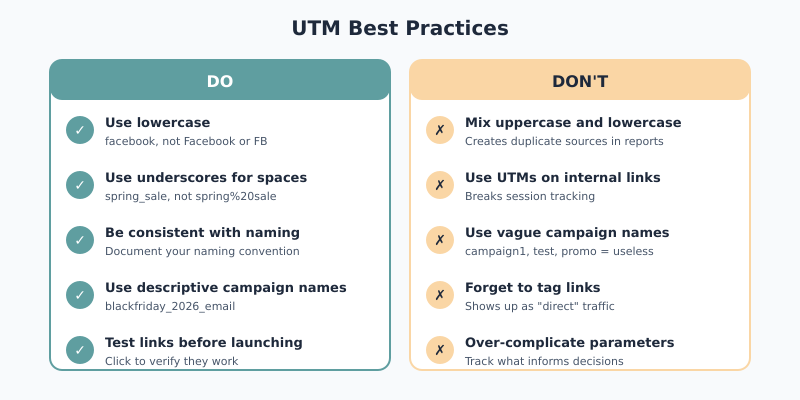
1. Always Use Lowercase
UTM parameters are case-sensitive. Facebook, facebook, and FACEBOOK will appear as three separate sources in your reports.
Pick lowercase and stick with it.
2. Use Underscores, Not Spaces
Spaces in URLs become %20, making reports hard to read:
- Bad:
spring%20sale%202026 - Good:
spring_sale_2026
3. Be Consistent With Naming
Create a naming convention and document it. Decide once whether you’ll use:
facebookorfbemailornewsletterpaidorcpcorpaidsocial
4. Don’t Use UTMs for Internal Links
UTM parameters are for external traffic sources only. If you add UTMs to links within your own site, you’ll break session tracking — a visitor clicking from your blog to your product page will start a “new” session attributed to an internal campaign.
5. Keep Campaign Names Descriptive
You’ll be reading these in reports months later. Make them self-explanatory:
- Bad:
campaign1,test,promo - Good:
blackfriday_2026_email,webinar_analytics_feb
Where to Use UTM Parameters
Tag every external link you control:
| Channel | Example UTM Setup |
|---|---|
| Email newsletters | ?utm_source=newsletter&utm_medium=email&utm_campaign=weekly_digest |
| Facebook Ads | ?utm_source=facebook&utm_medium=paid&utm_campaign=spring_sale |
| Instagram bio | ?utm_source=instagram&utm_medium=organic&utm_campaign=bio_link |
| LinkedIn posts | ?utm_source=linkedin&utm_medium=organic&utm_campaign=thought_leadership |
| Partner/affiliate | ?utm_source=partner_name&utm_medium=referral&utm_campaign=affiliate_q1 |
| QR codes (print) | ?utm_source=flyer&utm_medium=print&utm_campaign=conference_2026 |
Viewing UTM Data in Analytics
Google Analytics 4
To see your UTM campaign data in GA4:
- Go to Reports → Acquisition → Traffic Acquisition
- Change the primary dimension to Session source/medium
- Add secondary dimension: Session campaign
For deeper analysis, use Explore to build custom reports combining UTM dimensions with conversion data.
WordPress Plugins
If you’re using MonsterInsights or Analytify, campaign data appears directly in your WordPress dashboard — no need to log into Google Analytics.
Tracking UTM Parameters on Forms and Leads
For lead generation sites, you want UTM data attached to each form submission. Here’s how:
Using HandL UTM Grabber
This plugin automatically captures UTM parameters and stores them in cookies. When a visitor fills out a form (Contact Form 7, WPForms, Gravity Forms, etc.), the UTM data is included in the submission.
- Install and activate HandL UTM Grabber
- Add hidden fields to your form for each UTM parameter
- The plugin auto-populates these fields with captured data
Now every lead includes attribution data — you’ll know exactly which campaign generated it.
For WooCommerce
If you’re running an online store, plugins like AFL UTM Tracker or WooCommerce UTM Tracking add UTM data to each order. You can see first-touch and last-touch attribution directly on the order details page.
Common UTM Mistakes to Avoid
1. Inconsistent Naming
If one person uses facebook and another uses Facebook, your data splits into two sources. Create a documented naming convention.
2. Using UTMs on Internal Links
This breaks session tracking. A visitor navigating your site shouldn’t trigger new campaign attributions.
3. Forgetting to Tag Links
That email you sent without UTMs? It probably showed up as “direct” traffic. Tag everything before you hit send.
4. Over-Complicated Parameters
You don’t need to track every micro-variation. Focus on what will actually inform decisions.
5. Not Testing Links
Always click your UTM links before launching a campaign. A typo in the URL means broken tracking — or worse, a 404 error.
UTM Parameters: The Bottom Line
UTM parameters are the simplest way to understand where your traffic comes from. They cost nothing, take seconds to set up, and transform your analytics from “we got 500 visitors” to “we got 500 visitors — 200 from the newsletter, 150 from Facebook ads, and 100 from that LinkedIn post.”
Start here:
- Pick a naming convention (lowercase, underscores)
- Tag your next email campaign with proper UTMs
- Check the results in GA4 under Traffic Acquisition
Once you see the data, you won’t send another untagged link again.